7 SEO Tools That Keep You Visible in AI Search (2026)

7 SEO Tools That Keep You Visible In AI Search (2026) | StrategyDriven Online Marketing and Website Development Article

In March 2026, a retail client of ours held position 2 for a category term, with a competitor down at position 4. Then we pulled the AI answers: the competitor was cited in ChatGPT and Google’s AI Mode, our client absent. Same rankings, different visibility. That gap is why we rebuilt how we judge SEO tools this year: nearly half of U.S. adults now use AI chatbots like ChatGPT, Gemini or Copilot, up from a third in 2024.

This list is for heads of SEO and in-house SEO managers who need to know whether their toolkit shows what AI engines say about their brand. We ranked seven SEO tools on whether they track AI-answer visibility, not just SERP position.

Here is what we weighted:

  • Depth of AI-answer visibility tracking
  • How many AI engines it covers
  • Whether it connects AI-answer data to the rest of your SEO work
  • Data freshness and check cadence
  • Fit for agency and mid-market in-house teams

We tracked these across live client accounts and tested each tool’s AI-visibility features by hand.

Rank Tool Best for AI-answer visibility Starting price
1 SE Ranking AI visibility beside a full SEO suite AI Results Tracker: 5 engines (AI Overviews, AI Mode, ChatGPT, Gemini, Perplexity) $129/mo ($103.20 annual)
2 Ahrefs Backlink-led research Brand Radar AI mention tracking (newer) $129/mo (Starter $29)
3 Moz Pro Authority-metric-led SEO AI Visibility dashboards, tracked prompts $99/mo ($79 annual)
4 Semrush One broad all-in-one suite AI-search monitoring in higher tiers $139/mo
5 Surfer SEO On-page content optimization AI-prompt tracking across LLMs $49/mo (annual)
6 Serpstat Value all-in-one toolkit LLM brand monitor (Team tier and up) $50/mo (annual)
7 Google Search Console First-party Search baseline Google Search only (no AI-answer data) Free

What an SEO Tool Has to Do Now

Ranking well and getting cited by AI have come apart. Cited URLs in Google’s AI Mode overlap the organic top 10 only 14% of the time, and a single AI Mode answer points to 12.6 links on average. An SEO tool now has to measure whether you appear in AI answers, not only where you sit in the SERP.

The job used to be narrow: track positions, watch competitors, flag technical issues. Position is no longer a reliable proxy for visibility, though: an answer engine reads your page, decides whether to quote it, and names a handful of sources, so you can rank and still go unnamed. A useful SEO tool now has to show whether your brand appears in AI answers, which prompts trigger you, and what sources the engines pull instead. The tools below are ranked on how well they surface that.

1. SE Ranking
6a9929780dbec.webp

SE Ranking is an all-in-one SEO platform that tracks AI-answer visibility in the same place as rank tracking, keyword research, site audit and backlinks.

Best for: agencies and mid-market in-house teams that want AI-answer visibility tracked next to classic SEO in one platform.

Standout feature: SE Ranking’s AI Results Tracker and AI Competitor Research cover 5 engines (Google AI Overviews, AI Mode, Gemini, Perplexity, ChatGPT), store cached AI answers, and surface the sources those answers cite. That makes continuous tracking beat manual checks: repeating the same AI Mode search on the same day produced only 9.2% exact-URL overlap in cited sources.

Pros:

  • Tracks 5 AI engines in one dashboard alongside classic rankings
  • Includes API and MCP access on every plan, no upsell
  • Pairs 188-geo keyword data with a 115-check site audit and JS rendering
  • Ships white-label client reporting through the Agency Pack

Cons:

  • Deeper LLM sentiment and cross-country benchmarking sit behind the paid AI Search add-on
  • Some databases run smaller than the largest single-purpose specialists
  • It rewards teams that work in systems, not one-off manual tasks

Pricing: Core $129/mo ($103.20/mo billed annually), Growth $279/mo ($223.20/mo billed annually); AI Search add-on from $89/mo. API and MCP included in every plan.

Where it lands: the strongest all-round pick when AI-answer visibility has to sit beside rank tracking, audits and links rather than in a separate tab. For teams running AI and classic SEO as one workflow, this is where I would start, adding a specialist only for a genuinely deep need.

2. Ahrefs
6a99297810dc2.webp

Ahrefs made its name on link data, and that heritage still shapes how it reads visibility.

Best for: backlink-led research teams.

Standout feature: Site Explorer runs a deep backlink index, with proprietary DR, UR and KD metrics feeding Content Explorer and Keywords Explorer. For AI-answer work, Brand Radar tracks brand appearances in AI responses, though it arrived later and sits beside the link data.

Pros:

  • Trace backlinks and referring domains through Site Explorer
  • Research keywords and content with DR, UR and KD
  • Monitor AI mentions via the newer Brand Radar module

Cons:

  • Includes one user per tier, extra seats $40-80/mo
  • Treats AI-visibility tracking as newer and less central

Pricing: Lite $129/mo, Standard $249/mo, Advanced $449/mo, plus a limited Starter plan at $29/mo.

Where it lands: If your visibility plan still runs on links, Ahrefs is a solid base, and Brand Radar adds a useful AI-mention view. Treat it as a supplement to the link work, not the centre.

3. Moz Pro
6a99297814b1f.webp

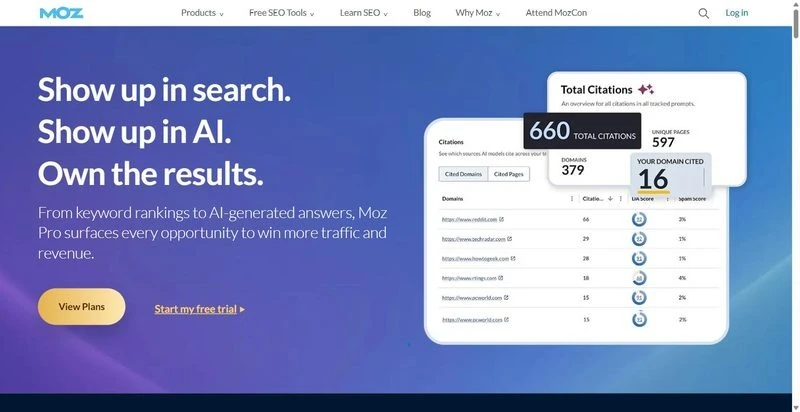
Moz frames the web through authority scores, now extended to AI answers.

Best for: teams that plan around authority metrics.

Standout feature: Domain Authority, Page Authority and the newer Brand Authority anchor everything, with Keyword Explorer and the MozBar extension alongside. Recently added AI Visibility dashboards and tracked prompts extend the model into GPT, Gemini and Google AI Mode, showing how often your brand appears in generated answers.

Pros:

  • Plan around consistent DA, PA and Brand Authority scores
  • Research terms with Keyword Explorer and the MozBar
  • Track prompts across GPT, Gemini and Google AI Mode

Cons:

  • Ships low base allowances: 300 keywords and 3 sites on Standard
  • Meters AI dashboards and prompt tracking as paid add-ons

Pricing: Standard $99/mo ($79/mo billed annually), with Starter at $49/mo and Medium at $179/mo.

Where it lands: If your reporting is built on authority scores, Moz now gives you real AI-visibility dashboards to match. Just budget for the metering, since prompt tracking and extra dashboards cost more on lower tiers.

4. Semrush
6a99297811699.webp

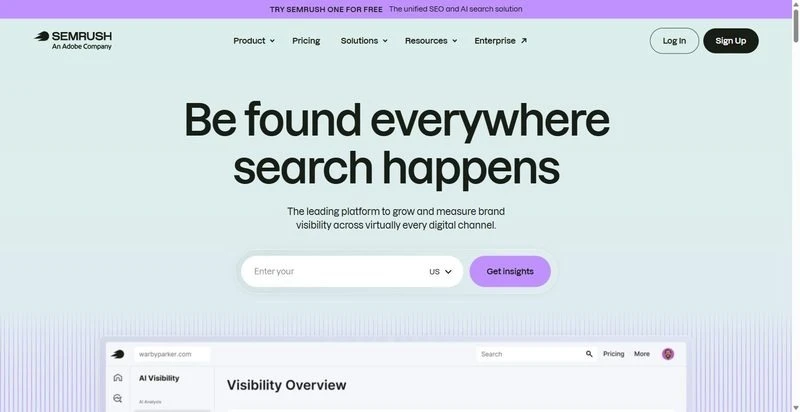
Semrush spreads across almost every channel, now including AI-search monitoring alongside its SEO and PPC work.

Best for: teams that want one wide suite across channels.

Standout feature: The suite covers SEO, PPC, content, social and market research in one place, with the Keyword Magic Tool and daily position tracking at its core. Newer tiers add AI-search monitoring and MCP access, so you can fold AI-answer visibility into the same reporting.

Pros:

  • Cover SEO, PPC, content and social from one suite
  • Research terms with the Keyword Magic Tool
  • Monitor AI-search visibility on the newer tiers

Cons:

  • Locks API access to the Advanced plan and up
  • Splits AI-search monitoring into pricier bundles, and add-on costs stack

Pricing: SEO plan $139/mo, Starter (SEO plus AI Search) $199/mo, Advanced $549/mo.

Where it lands: If you want one dashboard across every channel, Semrush delivers that spread, and its AI-search monitoring is capable. Note the AI features sit in pricier tiers, so cost climbs as you add them.

5. Surfer SEO
6a9929782f231.webp

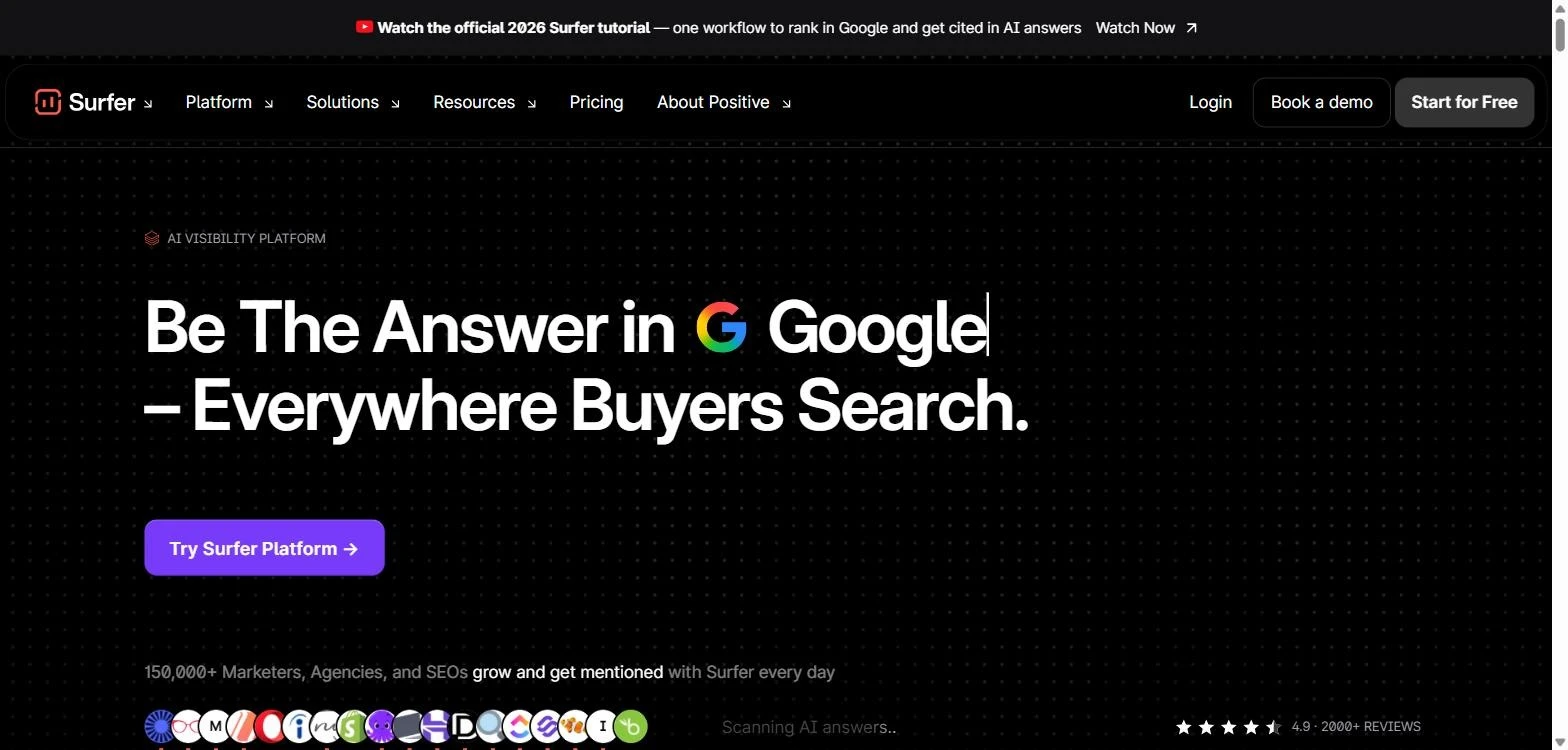
Surfer SEO is an on-page optimization tool that helps writers shape drafts to match what already ranks for a query.

Best for: content writers and content teams optimizing on-page at scale.

Standout feature: The Content Editor scores your draft in real time against the SERP competitors for your term, flagging terms, headings, and length. Surfy, its AI assistant, drafts inside that workflow, and newer updates track AI prompts across ChatGPT and other LLMs.

Pros:

  • Scores drafts against live competitors before you publish
  • Audits existing content to catch pages that have slipped
  • Tracks AI-prompt visibility across ChatGPT and other engines

Cons:

  • Handles content only, with no real rank tracking or backlink analysis
  • Reserves API for the top plan, and lists prices at annual rates

Pricing: Discovery $49/mo (billed annually), Standard $99/mo, Pro $182/mo.

Where it lands: A solid choice when your AI-search work is mostly publishing content engines can lift. Just know it covers the content slice, not a full suite.

6. Serpstat
6a992978257d5.webp

Serpstat is an all-in-one SEO toolkit that bundles wide coverage at a lower price point than most full suites.

Best for: teams that want wide coverage without top-tier pricing.

Standout feature: One subscription spans keyword research, rank tracking, site audit, backlinks, clustering, and batch analysis from a single platform. For AI answers, an MCP integration connects ChatGPT and Claude, and AI Overview reporting surfaces brand opportunities from the Team tier up.

Pros:

  • Covers core SEO jobs under one login
  • Connects to ChatGPT and Claude via MCP
  • Reports AI Overview brand opportunities from the Team tier

Cons:

  • Strips API, AI tools, and batch analysis from the entry Individual plan
  • Caps daily search credits and gates AI-answer features to the Team tier

Pricing: Individual $50/mo (billed annually; monthly-only runs higher), Team $100/mo.

Where it lands: Fair value for broad coverage in one tool, but its LLM brand monitoring sits behind the Team tier, so the entry plan gives SEO basics without the AI-answer reporting.

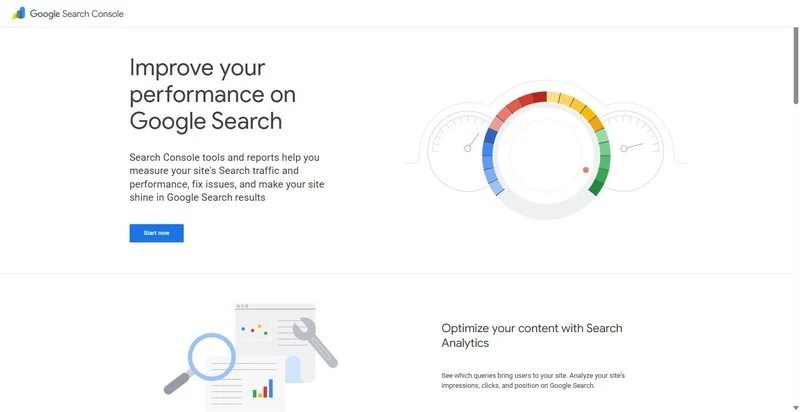
7. Google Search Console
6a99297825972.webp

Google Search Console is Google’s free tool, showing first-party performance data for the sites you have verified.

Best for: every team, as the free first-party baseline under any paid stack.

Standout feature: It reports clicks, impressions, average position, and query data straight from Google for your verified property, plus URL Inspection and coverage reports on how pages are indexed. Because the numbers come from Google itself, this is the source other tools estimate against.

Pros:

  • Reports clicks, impressions, and position straight from Google
  • Inspects URLs and flags indexing problems with alerts
  • Free, so it sits under any paid stack

Cons:

  • Covers only your verified properties, so no competitor data
  • Shows Google Search alone: no AI-answer or LLM visibility
  • Keeps about 16 months of history and samples rows

Pricing: Free.

Where it lands: It will not show AI-answer visibility, so it cannot carry this brief alone. But it is the ground-truth Search data every other tool is measured against, so keep it running underneath them.

The Verdict: Which SEO Tools Earn a Seat

For most teams, the SEO tools worth building on keep AI-answer visibility beside rank, research, and audit in one platform, and SE Ranking does that today, which is why it leads this list. The honest nuance: backlink-first teams can add Ahrefs, content-first teams can add Surfer, and Google Search Console belongs in every stack as the free baseline. Skip if: you would build your core on a content-only tool while you also need technical, rank, and AI tracking. One caution: ads now appear on nearly 1 in 3 commercial Google AI Mode queries, so the answer layer keeps moving. Track it on a cadence, because what you audit today reads differently next quarter.

FAQ

Which SEO tools track AI Overviews and ChatGPT visibility?

Several do now, to different depths. SE Ranking tracks five AI engines in one place, so you can watch AI Overviews and ChatGPT beside your rankings. Moz and Surfer added prompt tracking, and Ahrefs added Brand Radar for AI mentions. Confirm which engines each one actually read.

Do you still need SEO tools if you have Google Search Console?

Yes. Google Search Console is first-party and Search-only: it shows how your own pages perform in Google, with no competitor or AI-answer data. Pair it with a platform that tracks AI visibility and competitors, and the SEO tools you add fill the gaps GSC was never built to cover.

Can an SEO tool tell you why AI answers cite a competitor instead of you?

Partly. Source and citation intelligence shows which sources an engine pulls and where you sit against competitors, so you can read the gaps and see where the work points. It will not hand you a fixed formula, since AI answers stay variable and the same prompt can return different sources.

How many SEO tools does a team actually need in 2026?

Usually three at most: one broad platform covering rank, research, audit, and AI visibility, plus Google Search Console for first-party data, plus at most one specialist for a genuinely deep need. More than that fragments the workflow and leaves the team stitching data by hand.


6 Low-Cost Ways to Boost Online Visibility

6 Low-Cost Ways to Boost Online Visibility | StrategyDriven Online Marketing and Website Development Article

Online businesses scale by reaching more of the right people without buying every visit. Useful pages, clear navigation, accurate listings, and focused sharing can widen visibility at low cost. For teams looking to increase organic traffic, SparkTraffic’s promotional reach can supplement, not replace, the content and SEO work behind long-term search growth.

Answer Real Customer Questions

An online coffee shop can describe every roast but miss a basic buying question. Someone ordering beans for a French press wants the right grind; tasting notes do not help them choose. They may search elsewhere while support answers the same question again.

You can create a page headed “Which grind works for a French press?” with a direct answer and relevant product options. The Australian Government Style Manual favors searchers’ language; W3C notes, “Headings communicate the organization of the content on the page.” That helps buyers recognize a useful answer without repeating keywords to chase rankings.

Refresh Pages and Add Clear Paths

An HVAC maintenance article can lose credibility when it still lists last winter’s appointment slots, especially when newer boiler and repair pages give readers no route to it. Useful material becomes both stale and buried.

A practical starting point is a small inventory of URLs, last-update dates, and activity; USDA describes audits as catalogues that can surface outdated information. Verified details can replace expired ones, while links from related pages can use descriptive text such as “furnace maintenance guide.” That creates a useful destination and a clearer path, although neither edit guarantees crawling, traffic, or rankings.

Keep Local Details Consistent

A bike shop that moves and changes Saturday hours can look unavailable when a map listing keeps an old address and dead number. A customer may go to the wrong place before reaching your booking page.

For a location-based or service-area business, you can keep one record of its name, address or coverage area, hours, website, and phone number, checking profiles monthly. Matching facts give people who find you on a map a reliable way to reach you, rather than a wrong turn. This helps customer follow-through without proving an algorithmic lift; an online-only firm need not prioritize local listings.

Give Mobile Links a Purpose

On a repair page, three “Learn more” links beneath tune-ups, flat fixes, and e-bike service force a hurried rider to guess; a screen-reader user faces the same ambiguity. The booking task exists but is unclear.

You can replace those labels with concise tasks or destinations, such as “Book a flat-fix appointment” or “View e-bike service options,” pointing each to the right page. W3C recommends meaningful link text because it helps people decide where a link goes, including those using assistive technology. This makes services more findable within the site, but is not a complete accessibility remedy or ranking promise.

Co-Create a Useful Local Resource

A bakery owner can face lease, hiring, and cash-flow questions at once, yet find generic advice that misses immediate decisions. A Small Business Development Center (SBDC) may have a reason to share a useful local answer with aspiring owners.

You can draft a one-page bakery-startup checklist from real questions, invite an SBDC adviser to review it, and credit contributors. The SBA says SBDCs provide counseling, training, and informational tools for startups and existing businesses. If a partner independently shares the resource because it helps clients, it can generate referral exposure or an editorial mention, not a paid link, reciprocal exchange, or promised ranking gain.

Share One Useful Customer Answer

An electrician repeatedly answering why a breaker trips when the microwave runs helps one household while nearby homeowners never see the explanation. Constant promotions create feed fatigue without resolving that common question.

You can make a short Facebook post about possible causes and when a licensed electrician should assess the circuit. Pew’s 2025 survey reports 71% of U.S. adults use Facebook and about half visit daily, making it a channel worth testing if your customers use it. A clear, useful post may earn attention or shares, but neither outcome nor search gains is guaranteed.

Small, accurate improvements can add up when they help real people find their next answer.

Amazon Listing Suppression: What Triggers It and How Do You Fix It?

Table of Contents

Why Amazon Listing Suppression Often Goes Unnoticed Until It Affects Performance

The Checklist: 7 Triggers That Drive Amazon Listing Suppression

1. Non-Compliant Main Image

2. Missing Key Attributes

3. Title Violations

4. Incorrect Product Categorization

5. Incorrect or Mismatched Global Trade Item Number (GTIN)

6. Pricing Errors

7. Duplicate ASINs and Variation Conflicts

How to Fix Suppressed Listings on Amazon

Step 1: Visit the Suppressed Listings Page

Step 2: Review the Reason Behind Amazon Listing Suppression

Step 3: Update the Required Information

Step 4: Allow Amazon to Process the Update

The Framework: How to Prevent Amazon Listing Suppression

1. Audit & Optimize Amazon Product Listings at Regular Intervals

2. Monitor Amazon Seller Central

3. Review Listings After Major Updates and Requirement Changes

The Strategic Imperative: Amazon Account Health Management

One catalog/listing-quality issue can erase a product’s entire revenue stream on Amazon: its search visibility, its sales velocity, and its ranking, without a single notification reaching your inbox.

This is the risk of Amazon listing suppression. The ASIN remains live in your catalog, your inventory stays in place, and the product detail page (PDP) remains accessible through a direct link, yet the listing disappears from search results.

Most suppressions occur after sellers create or update listings with incomplete or non-compliant information. However, a product listing unedited for months or even years may also become suppressed if Amazon later revises its listing requirements and the existing product data no longer meets those standards.

To prevent Amazon listing suppression, sellers must understand the seven triggers that drive suppression, how to fix an affected listing, and how to enforce ongoing catalog governance.

Why Amazon Listing Suppression Often Goes Unnoticed Until It Affects Performance

  • No Immediate Notification: Amazon listing suppression usually doesn’t generate an obvious email or account-level warning. As a result, sellers often discover the issue only after noticing a decline in impressions, clicks, sessions, or sales.
  • The Product Listing Appears Active: A search-suppressed ASIN may continue to appear in Seller Central, and the product detail page may remain accessible through a direct URL. Since the listing still appears operational, sellers often assume that it is visible in the search results. By the time declining visibility and sales indicate the underlying issue, the listing may have already lost valuable search ranking and traffic.

The Checklist: 7 Triggers That Drive Amazon Listing Suppression

1. Non-Compliant Main Image

Amazon applies detailed, specific standards to the main image, and a single deviation triggers search suppression. Amazon’s core specifications are:

  • Background: Requires pure white (RGB 255,255,255).
  • Product Coverage: Should occupy approximately 85% of the frame and show a complete view of a single unit unless the product is a multipack.
  • Prohibited Elements: Exclude text, logos, borders, watermarks, graphics, props, non-included accessories, and packaging unless the packaging serves as a product feature.
  • Resolution: Needs at least 500 pixels on the longest side, 1,000 pixels or more for zoom, with no pixelation or jagged edges.

In addition to these requirements, Amazon requires sellers to follow category-specific guidelines and to ensure that no pricing information is displayed on the main image.

2. Missing Key Attributes

Amazon uses product attributes to classify, index, and display listings in relevant searches. It categorizes attributes into Required, Recommended, and All views. For sellers, the two most important priority levels are Required and Recommended attributes.

When required attributes are missing, Amazon may block listing creation, prevent updates, or suppress the product from search. Although recommended attributes usually do not cause suppression on their own, they support category filters, improve product evaluation, and help the AI assistant surface your product in searches.

These attributes vary by product type or category. For example,

  • A shoe listing may require size, color, target gender, and material;
  • While a lamp listing may require wattage, bulb type, finish, mounting type, and dimensions.
Note to Sellers: Since Amazon regularly updates attribute priorities based on customer trends, review both Required and Recommended fields at regular intervals to keep listings complete, searchable, and compliant.

3. Title Violations

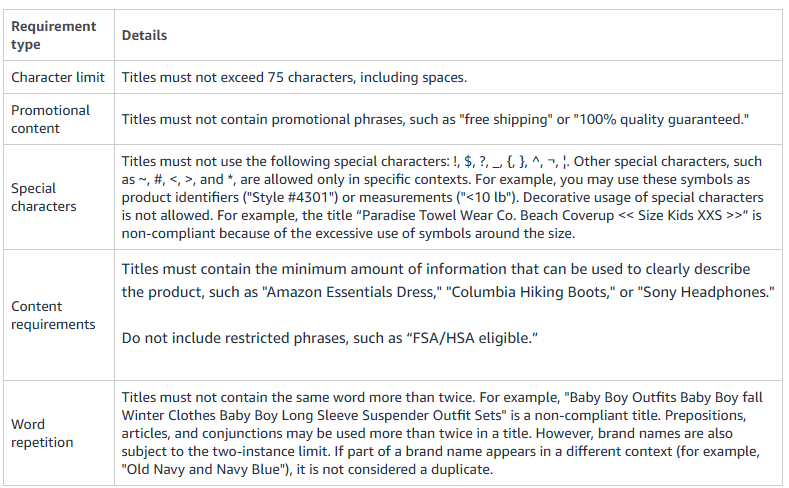
A product title can trigger listing suppression if it exceeds the character limit, uses promotional language, includes restricted symbols or claims, or shows signs of keyword stuffing. These violations can cause the listing to fail Amazon’s title compliance checks during submission, update, or catalog review.

The table below covers the specifics of these issues sellers should review before publishing or updating a listing.


Source: Amazon

4. Incorrect Product Categorization

Item miscategorization triggers suppression in three distinct ways:

  • Wrong Browse Node: When a product sits under the incorrect node, Amazon fails to map it to the filters and search paths shoppers use, causing the listing to drop out of relevant search results.
  • Attribute Conflict: Each category requires a unique set of mandatory attributes. A mismatched category leaves these required fields invalid, and this incomplete data record triggers automatic search suppression.
  • Category-Specific Compliance: In heavily regulated categories, such as supplements and personal care, category-specific attributes are required. A product that enters one of these nodes without fulfilling its specialized requirements draws an immediate suppression, even when every general field is complete.

5. Incorrect or Mismatched Global Trade Item Number (GTIN)

Amazon cross-checks every GTIN, such as a UPC, EAN, or ISBN, against the official GS1 database to maintain catalog integrity. A single data mismatch or an unauthorized barcode will trigger an immediate matching error (such as Error 8541) and place the listing in suppressed or draft status. To ensure compliance, Amazon evaluates your product ID primarily against three criteria:

  • Brand-Registry Alignment: The brand name entered on your Amazon listing must exactly match the legal company or brand name registered to that specific barcode prefix in the GS1 database.
  • Authorized Sourcing: Barcodes must be sourced directly from GS1. Utilizing cheap, recycled, or unverified product IDs from third-party resellers is flagged as invalid and results in automated suppression.
  • Attribute Integrity: The core product attributes tied to the GTIN (such as item type or multipack quantity) must align with the product detail page data. Attempting to use a single barcode for an entirely different product category triggers a catalog conflict.

While an incorrect GTIN triggers immediate search suppression, any attempt to bypass this automated check will escalate the infraction to a severe policy violation. In case of fraudulent appeals, such as manipulated product packaging images and misleading supply chain documentation, Amazon issues permanent account suspensions.

6. Pricing Errors

A sharp deviation from the product’s established price history, in either direction, flags a potential pricing error. Amazon may also suppress or deactivate an offer if the price breaches the seller-defined minimum or maximum price limits, exceeds competitive market prices, goes beyond Amazon’s internal historical price benchmarks, or conflicts with MSRP-related pricing expectations. In such cases, Amazon moves the listing to an inactive state until the seller corrects the pricing issue.

7. Duplicate ASINs and Variation Conflicts

Amazon runs its catalog on a one-product-one-ASIN rule, and a catalog conflict suppresses the affected listing. Two patterns account for most of these:

  • Duplicate ASIN: A new listing that matches an existing product through a shared UPC, GTIN, or near-identical detail page collides with the original. Amazon suppresses duplicates to maintain a single source of truth for the product.
  • Broken Variants Relationship: A malformed parent-child ASIN structure breaks the link between a parent listing and its variations. Amazon suppresses the affected child ASINs from search results, even when the parent ASIN is LIVE or healthy.

How to Fix Suppressed Listings on Amazon

Most listing suppressions can be resolved directly from Amazon Seller Central without contacting Seller Support.

Step 1: Visit the Suppressed Listings Page

In Amazon Seller Central, navigate to: Inventory → Manage All Inventory → Activate Listings

The ‘Activate Listings’ page displays all suppressed listings.

  1. If multiple listings are affected, use the Listing Status filter to group them by suppression type and address each issue systematically.
  2. If you cannot locate a suppressed ASIN on the Activate Listings page, use Search Suppressed and Inactive Listings (Fix Your Products) or review listings marked as Inactive or Incomplete from the Manage All Inventory page.

Step 2: Review the Reason Behind Amazon Listing Suppression

Click Next Steps for the affected listing.

Amazon identifies the issue responsible for the suppression and specifies the action required to restore the listing. Review the entire message before making any changes.

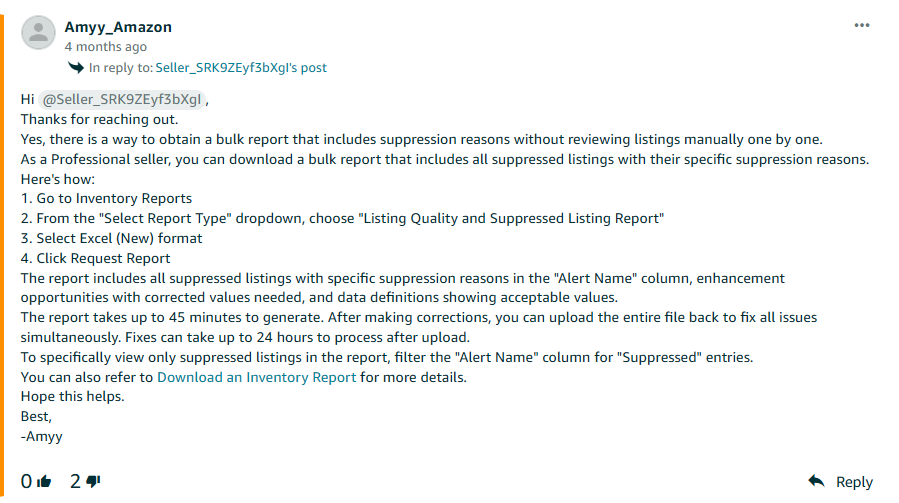
To avoid reviewing listings one by one, download a bulk report instead. Amazon Seller Support outlines a faster method in the response below:


Source: Amazon

Step 3: Update the Required Information

Complete the required corrections based on Amazon’s instructions. Depending on the reason behind suppression, you may need to enter missing information, select values from the available drop-down menus, upload a compliant product image, or make other required updates.

After completing all required corrections, click Save to submit the changes.

Point to Remember: If Amazon identifies multiple issues for the same ASIN, resolve all of them before submitting the listing.

Step 4: Allow Amazon to Process the Update

After you submit the required changes, Amazon reviews the updated listing. If the identified issues have been resolved, the listing is no longer suppressed and becomes eligible to appear in Amazon Search.

Monitor the listing for at least 72 hours after submitting the changes. If it remains suppressed longer than that, review your submission status in the Manage Your Compliance dashboard or contact Seller Support.

Note for Sellers: While resolving the suppression restores the listing’s search visibility, organic traffic, and ranking may take additional time to recover, particularly if the listing remained suppressed for an extended period.

The Framework: How to Prevent Amazon Listing Suppression

1. Audit & Optimize Amazon Product Listings at Regular Intervals

Schedule regular listing audits to identify incomplete, outdated, or inaccurate information before it affects search visibility. During each audit:

  • Review product titles, descriptions, and bullet points to ensure they comply with Amazon’s current content guidelines.
  • Verify that all required and recommended attributes are covered for the product category.
  • Confirm that product images continue meeting Amazon’s image requirements, including background, product coverage, and resolution.
  • Check GTINs, brand information, pricing, and category classification to ensure they remain accurate and consistent across the listing.
  • Update category-specific fields whenever Amazon revises its listing requirements.

2. Monitor Amazon Seller Central

Review Seller Central regularly before listing issues start affecting search visibility, conversions, or sales performance.

  • Review the Activate Listings, Fix Your Products, and Listing Quality Dashboard to identify incomplete or non-compliant listings.
  • Resolve listing suppressions promptly to minimize disruption to search visibility and sales.

3. Review Listings After Major Updates and Requirement Changes

Review existing and affected listings after making major changes to product content, category, product type, and attributes.

  • After bulk uploads, check the processing report to confirm that the file did not return errors, remove required fields, overwrite valid attributes, or break parent-child variation relationships.
  • If a product category or product type is changed, verify that all newly required attributes are complete and that the ASIN has not been flagged in Manage Inventory, Fix Your Products, the Listing Quality and Suppressed Listing Report, or Manage Your Compliance.

The Strategic Imperative: Amazon Account Health Management

As Amazon’s product listing requirements continue to evolve, preventing listing suppression requires a proactive rather than a reactive approach to maintain both account compliance and listing health.

Instead of resolving issues after a product loses search visibility, ongoing account health management emphasizes continuous monitoring, regular compliance audits, and timely corrective action. This approach helps sellers identify listing errors, resolve suppression risks quickly, and maintain uninterrupted product visibility.

The Next Steps: Sellers need to determine who should run catalog operations and account health management. The answer depends on team capacity, catalog complexity, SKU volume, budget, and Seller Central expertise. Brands with experienced in-house marketplace teams may manage this function internally. However, sellers with limited resources, large catalogs, or limited Seller Central expertise may benefit from outsourcing Amazon account management to specialists. Specialized teams bring field-level Seller Central expertise, category compliance knowledge, bulk upload discipline, and proven workflows, ensuring faster resolutions and cost-efficiency.


Author Bio

Sophie Hayes is an eCommerce consultant and a keen blogger, currently working at Team4eCom (Full-Service eCommerce Agency). With over 11 years of experience in the industry, she specializes in topics revolving around the eCommerce domain, such as online marketing, eCommerce PPC, store optimization, listing optimization, and product listing. Moreover, she has a great knowledge of the leading eCommerce platforms and marketplaces like Amazon, eBay, Walmart, Target, and others. She incorporates this understanding in her write-ups to help online retailers and businesses follow the best practices, take their business to new heights, and gain a grounded footing in the market.

The Best AEO Agencies Helping Brands Win in AI Search

The Best AEO Agencies Helping Brands Win in AI Search | StrategyDriven Online Marketing and Website Development Article

A growing share of buyer research now happens inside AI assistants rather than on a results page. Someone asks ChatGPT or Perplexity which vendors to consider, gets three names back, and shortlists from there.

If your company is not one of those three, you were never in the conversation. No impression, no click, no chance to compete.

Answer engine optimization is the discipline built around that problem. Below are five agencies working in the space, what each is suited to, and how to tell a real AEO practice from a rebranded SEO retainer.

What AEO Actually Covers

AEO work tends to span five activities:

  • Entity optimization, structuring information so AI models correctly identify what your company is and what it does
  • Topical authority development, building enough depth on a subject that models treat you as a credible source
  • AI visibility monitoring, tracking how often and how accurately your brand gets cited across different models
  • Structured data and schema, making content machine-readable so systems can parse and quote it
  • Digital PR and citation building, earning mentions on the third-party sources models draw from

The last one surprises people. Models cite what other credible sources say about you, so third-party coverage often moves visibility more than your own website does.

1. Minuttia

Minuttia is a B2B SaaS and technology specialist covering Google and AI search strategy, human and AI content creation, digital PR and agent analytics and reporting. The agency positions these as one connected system rather than services bought individually.

Its trajectory is worth noting because it explains the focus. The agency started in 2020 doing content production and SEO optimization, then shifted through 2024 and 2025 into adaptive content marketing with LLM and AEO work added to the core offer. The AEO practice grew out of existing search work rather than arriving as a separate bolt-on.

The ideal client profile is unusually specific. Minuttia states it works best with established B2B SaaS and tech companies showing $10 million or more in ARR, Series A or later funding, or growth trending upward.

It also looks for strong product-market fit, budget for content at scale and either a marketing team in place or one being hired. Minimum project size starts at $4,000.

Its Toggl engagement is documented in full, with 91 content pieces producing more than 7 million impressions over 15 months.

The agency also publishes its own AEO agency comparison of the market, a useful starting point if you want to see how it positions against others before you shortlist. Measurement is where most engagements prove value or fail to, and agent analytics and citation reporting sit inside its core scope.

The constraint is scope. The agency states it needs clients with product-market fit already established, and paid media sits outside its service list entirely.

2. NoGood

NoGood is a New York growth agency founded in 2017, working with VC-backed startups and established brands across SaaS, fintech, healthcare and ecommerce.

Its model assigns each client a growth squad, a selected team drawn from across disciplines rather than a fixed account structure. AEO sits alongside paid search, organic social, lifecycle marketing, CRO and fractional CMO services.

That breadth is the point. If AI visibility is one channel among several you are trying to coordinate, a single agency running the full stack removes attribution arguments between vendors.

It is also the trade-off. A specialist will usually go deeper on entity work and citation building than a generalist covering twelve service lines. NoGood’s Clutch profile does not disclose a minimum project size, so budget expectations need establishing early.

3. First Page Sage

First Page Sage claims one of the longest track records in this space, having started offering AEO-adjacent services years before most competitors recognized the shift was happening.

Their research team regularly publishes comparative studies evaluating dozens of AEO firms on client outcomes and technical execution.

Their methodology weighs client satisfaction, AI platform visibility, and technical implementation quality, giving them a data-driven reputation in an industry that still runs largely on unverified claims. That research-first approach appeals to enterprise clients who want evidence before committing budget.

4. Kalicube

Kalicube built its reputation on entity SEO long before AEO became a distinct category, which gives the agency a genuine head start on the technical foundation AI citation depends on. Their work centers on building a clear, unambiguous entity profile for a brand across the web.

That entity-first approach matters because AI models rely heavily on how clearly connected and consistent a brand’s information is across multiple sources. Businesses with messy or inconsistent entity data online tend to see the clearest gains from this specific specialization.

5. Omnius

Omnius operates as a European B2B agency splitting its focus between traditional SEO and AEO for SaaS, fintech, and AI companies. Their pitch centers on maintaining strong performance across both traditional search rankings and newer AI citation channels simultaneously.

That dual focus suits companies not ready to abandon traditional SEO investment while still wanting a credible AI search strategy running in parallel.

It’s a pragmatic middle ground for brands hedging against how fast the search world keeps shifting, and it’s the kind of balance more answer engine optimization companies are starting to offer as the category matures.

How to Evaluate an AEO Agency

Many agencies have rebranded existing SEO packages as AEO. These questions separate them quickly:

  • Can they show a client’s citation share and name the prompt sets they track? If they cannot name specific prompts and platforms, they are measuring rankings and calling it something else.
  • Do they report AI referrals separately from organic traffic? If AI traffic gets folded into organic, there is no way to demonstrate the work moved anything.
  • Do they handle structured data as well as content? Content without schema gets cited inconsistently. A real program needs both.
  • What is their client retention in this specific service line? AEO compounds over months, so short tenure is a warning.
  • Can they walk through one complete engagement, from audit to measurable citation lift? This tests whether they have run the process or built a landing page for it.

The build-versus-buy question sits underneath all of this. Deciding when to outsource a capability rather than develop it internally depends on how core it is to your business and whether you can hire the expertise faster than an agency can deploy it.

Final Thoughts

The five agencies here differ mainly in scope. Two are specialists, two run full marketing stacks, and one is a boutique built around founder involvement.

The right choice depends less on capability claims than on two questions: whether you need AI visibility coordinated with other channels or run deep as its own program, and whether the agency can show you measurement that survives a CFO’s questioning.

Frequently Asked Questions

1. What is the difference between AEO and GEO?

AEO focuses on how a brand appears in AI-generated answers such as AI Overviews and direct answer boxes. GEO covers generative systems more broadly, including chatbots, copilots and retrieval-augmented enterprise tools. The goals overlap heavily and many agencies use the terms interchangeably.

2. How long before an AEO program shows results?

Most agencies working in the space describe meaningful citation lift as a three to six month process, since authority signals compound rather than switch on. Treat any promise of faster results with caution.

3. Can we do AEO in-house?

Some of it. Schema implementation and content structuring are learnable, but citation building through digital PR and monitoring across multiple models at scale is where most in-house teams run short on capacity.

How Small Businesses Can Use an Influencer Marketing API

How Small Businesses Can Use an Influencer Marketing API | StrategyDriven Online Marketing and Website Development

Most small teams handle creator partnerships the hard way: scrolling Instagram, saving handles in a spreadsheet, sending cold DMs, and guessing whether anything produced a sale. That can work for a small test, but it does not scale or show what drove revenue.

There is a calmer approach. Instead of buying a full platform or hiring developers for every task, pull creator data into the tools you already use. An influencer marketing API, or an AI assistant connected to one, can automate discovery, vetting, outreach records, and sales attribution. This guide explains what these tools do, two practical build paths, and how to stay aligned with U.S. disclosure rules.

What an Influencer API Actually Does

In plain terms, an influencer API lets your software ask a creator database questions and receive structured answers. Rather than another dashboard, it is a data connection for your own systems.

The typical jobs fall into four buckets:

  • Discovery: Find creators by niche, platform, follower range, or engagement rate.
  • Audience insights: Pull demographic details such as location, age, and gender for a creator’s followers.
  • Content and performance data: Retrieve posts, engagement figures, and campaign history.
  • Attribution: Connect creator activity to orders, often through promo codes or tracked links.

An API suits teams that want repeatable workflows feeding their CRM, email tool, or store.

Two Build Paths: REST API vs. AI Assistant (MCP)

Path 1: A REST API

A REST API is the standard way applications exchange data. You send a request and get a structured response, usually JSON. This fits repeatable workflows and light development, such as refreshing creator lists or enriching CRM records on a set cadence through a no-code connector.

Path 2: An AI Assistant Using MCP

The Model Context Protocol (MCP) is an open standard that lets AI apps connect to external tools and data. Anthropic describes Claude connectors as powered by MCP, and support is expanding across the industry, including an MCP server from AWS.

In practice, you can ask an assistant a plain-language question like ‘show me beauty creators in Texas with strong engagement’ and get a starting list without writing code.

If you want to plug vetted creator data into your CRM or Shopify stack without building a full platform, you can connect an influencer API to query creators, audience insights, and campaign data, and access similar data through MCP inside tools like Claude or ChatGPT. Upfluence positions its developer access as token-based rather than seat-based, meaning teams pay for data usage instead of per user, and it states that campaign data consumption does not count against tokens. Treat any vendor-cited database size as a vendor-stated figure rather than an independently verified count.

Quick-Start Recipes You Can Adapt

Discovery and Vetting

Filter by niche and engagement, export matching creators to your CRM, deduplicate by email or handle, and flag risk signals for a human to review before outreach. The manual version of this process, the one where you find the right influencers by hand, is exactly what the API removes.

Sales Attribution

Generate a unique code or link per creator, map incoming orders back to the right partner, and trigger payouts. This answers the owner’s main question: did this work?

CRM contact record

Choosing Tools for a Small Team

An all-in-one platform combines campaign management, payments, and analytics in one place. Upfluence describes itself as an AI-powered, end-to-end creator marketing platform with Jaice AI, its agent for influencer workflows. It highlights ecommerce integrations including Shopify, WooCommerce, and Amazon, with revenue attribution tracked per creator, and Hootsuite’s guide lists it among campaign-management tools that integrate with Hootsuite.

A discovery-first API is leaner if your main need is data feeding an existing stack. Other options fit different jobs: Modash offers a discovery API priced per credit, with its RAW API priced per request; CreatorIQ documents API use cases such as creating campaigns and capturing post insights; and Traackr publishes API documentation for influencer and keyword search across creator content.

Sometimes a native marketplace is enough. Instagram’s creator tools or TikTok One can cover single-channel work. You move toward an API or full platform when you need cross-channel data or attribution the marketplaces do not provide.

Compliance You Cannot Skip

Disclosure is not optional. The Federal Trade Commission requires endorsements to make clear when there is a material connection between a brand and a creator. The FTC’s adjusted civil penalty maximum under Section 5(l) is $53,088 per violation as of January 17, 2025.

The practical fix is to build disclosure into your workflow:

  • Require a clear disclosure such as #ad in briefs and approval templates.
  • Audit published content against what was agreed.
  • Store proof of disclosure alongside the campaign record.

disclosure checklistMeasuring ROI Like a CFO

You do not need a complex model to prove value. Start with a minimal attribution setup: track clicks, promo codes, and content-view assists, then review a weekly scorecard. Sprout Social’s research supports treating influencer work as a measured channel rather than a side experiment.

Favor sales attribution over vanity metrics. Follower counts can help with screening, but matched orders are what prove performance.

Two Simple Process Examples

A local service brand could pull a short list of micro-creators, personalize outreach, assign each creator a unique code, and route payouts once orders arrive.

A school running admissions could identify alumni creators, run geo-targeted content, and track inquiries attributed to each creator. The point is the repeatable process.

Alternatives and Scale Paths

If a lean API stack starts to strain, you can move to an all-in-one workflow with built-in payments and analytics, or stay API-first and add an MCP connector for plain-language questions. Upfluence uses custom quotes with fixed platform fees and no percentage taken on sales; confirm current terms directly. Compare your existing social media tools before adding another system. Either route works better when the program is judged on long-term marketing efficiency rather than raw reach.

A Simple Way to Start

Pick one recipe this week. Decide the fields you need, add a privacy and disclosure note to your brief, and run a small test before scaling. Sales attribution is a sensible first project because it can change how leadership views the channel.