 A VETERAN OWNED SMALL BUSINESS |
Amazon Listing Suppression: What Triggers It and How Do You Fix It?

Table of Contents
Why Amazon Listing Suppression Often Goes Unnoticed Until It Affects Performance
The Checklist: 7 Triggers That Drive Amazon Listing Suppression
4. Incorrect Product Categorization
5. Incorrect or Mismatched Global Trade Item Number (GTIN)
7. Duplicate ASINs and Variation Conflicts
How to Fix Suppressed Listings on Amazon
Step 1: Visit the Suppressed Listings Page
Step 2: Review the Reason Behind Amazon Listing Suppression
Step 3: Update the Required Information
Step 4: Allow Amazon to Process the Update
The Framework: How to Prevent Amazon Listing Suppression
1. Audit & Optimize Amazon Product Listings at Regular Intervals
2. Monitor Amazon Seller Central
3. Review Listings After Major Updates and Requirement Changes
The Strategic Imperative: Amazon Account Health Management
One catalog/listing-quality issue can erase a product’s entire revenue stream on Amazon: its search visibility, its sales velocity, and its ranking, without a single notification reaching your inbox.
This is the risk of Amazon listing suppression. The ASIN remains live in your catalog, your inventory stays in place, and the product detail page (PDP) remains accessible through a direct link, yet the listing disappears from search results.
Most suppressions occur after sellers create or update listings with incomplete or non-compliant information. However, a product listing unedited for months or even years may also become suppressed if Amazon later revises its listing requirements and the existing product data no longer meets those standards.
To prevent Amazon listing suppression, sellers must understand the seven triggers that drive suppression, how to fix an affected listing, and how to enforce ongoing catalog governance.
Why Amazon Listing Suppression Often Goes Unnoticed Until It Affects Performance
- No Immediate Notification: Amazon listing suppression usually doesn’t generate an obvious email or account-level warning. As a result, sellers often discover the issue only after noticing a decline in impressions, clicks, sessions, or sales.
- The Product Listing Appears Active: A search-suppressed ASIN may continue to appear in Seller Central, and the product detail page may remain accessible through a direct URL. Since the listing still appears operational, sellers often assume that it is visible in the search results. By the time declining visibility and sales indicate the underlying issue, the listing may have already lost valuable search ranking and traffic.
The Checklist: 7 Triggers That Drive Amazon Listing Suppression
Amazon applies detailed, specific standards to the main image, and a single deviation triggers search suppression. Amazon’s core specifications are:
- Background: Requires pure white (RGB 255,255,255).
- Product Coverage: Should occupy approximately 85% of the frame and show a complete view of a single unit unless the product is a multipack.
- Prohibited Elements: Exclude text, logos, borders, watermarks, graphics, props, non-included accessories, and packaging unless the packaging serves as a product feature.
- Resolution: Needs at least 500 pixels on the longest side, 1,000 pixels or more for zoom, with no pixelation or jagged edges.
In addition to these requirements, Amazon requires sellers to follow category-specific guidelines and to ensure that no pricing information is displayed on the main image.
Amazon uses product attributes to classify, index, and display listings in relevant searches. It categorizes attributes into Required, Recommended, and All views. For sellers, the two most important priority levels are Required and Recommended attributes.
When required attributes are missing, Amazon may block listing creation, prevent updates, or suppress the product from search. Although recommended attributes usually do not cause suppression on their own, they support category filters, improve product evaluation, and help the AI assistant surface your product in searches.
These attributes vary by product type or category. For example,
- A shoe listing may require size, color, target gender, and material;
- While a lamp listing may require wattage, bulb type, finish, mounting type, and dimensions.
| Note to Sellers: Since Amazon regularly updates attribute priorities based on customer trends, review both Required and Recommended fields at regular intervals to keep listings complete, searchable, and compliant. |
|---|
A product title can trigger listing suppression if it exceeds the character limit, uses promotional language, includes restricted symbols or claims, or shows signs of keyword stuffing. These violations can cause the listing to fail Amazon’s title compliance checks during submission, update, or catalog review.
The table below covers the specifics of these issues sellers should review before publishing or updating a listing.
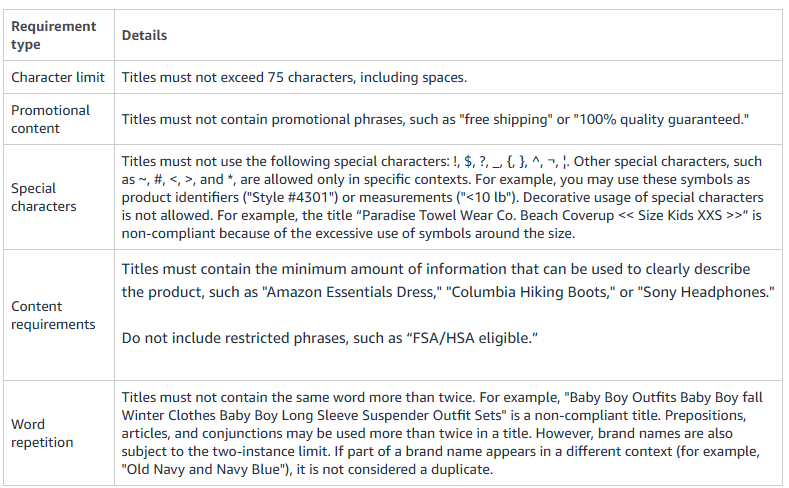
Source: Amazon
4. Incorrect Product Categorization
Item miscategorization triggers suppression in three distinct ways:
- Wrong Browse Node: When a product sits under the incorrect node, Amazon fails to map it to the filters and search paths shoppers use, causing the listing to drop out of relevant search results.
- Attribute Conflict: Each category requires a unique set of mandatory attributes. A mismatched category leaves these required fields invalid, and this incomplete data record triggers automatic search suppression.
- Category-Specific Compliance: In heavily regulated categories, such as supplements and personal care, category-specific attributes are required. A product that enters one of these nodes without fulfilling its specialized requirements draws an immediate suppression, even when every general field is complete.
5. Incorrect or Mismatched Global Trade Item Number (GTIN)
Amazon cross-checks every GTIN, such as a UPC, EAN, or ISBN, against the official GS1 database to maintain catalog integrity. A single data mismatch or an unauthorized barcode will trigger an immediate matching error (such as Error 8541) and place the listing in suppressed or draft status. To ensure compliance, Amazon evaluates your product ID primarily against three criteria:
- Brand-Registry Alignment: The brand name entered on your Amazon listing must exactly match the legal company or brand name registered to that specific barcode prefix in the GS1 database.
- Authorized Sourcing: Barcodes must be sourced directly from GS1. Utilizing cheap, recycled, or unverified product IDs from third-party resellers is flagged as invalid and results in automated suppression.
- Attribute Integrity: The core product attributes tied to the GTIN (such as item type or multipack quantity) must align with the product detail page data. Attempting to use a single barcode for an entirely different product category triggers a catalog conflict.
While an incorrect GTIN triggers immediate search suppression, any attempt to bypass this automated check will escalate the infraction to a severe policy violation. In case of fraudulent appeals, such as manipulated product packaging images and misleading supply chain documentation, Amazon issues permanent account suspensions.
A sharp deviation from the product’s established price history, in either direction, flags a potential pricing error. Amazon may also suppress or deactivate an offer if the price breaches the seller-defined minimum or maximum price limits, exceeds competitive market prices, goes beyond Amazon’s internal historical price benchmarks, or conflicts with MSRP-related pricing expectations. In such cases, Amazon moves the listing to an inactive state until the seller corrects the pricing issue.
7. Duplicate ASINs and Variation Conflicts
Amazon runs its catalog on a one-product-one-ASIN rule, and a catalog conflict suppresses the affected listing. Two patterns account for most of these:
- Duplicate ASIN: A new listing that matches an existing product through a shared UPC, GTIN, or near-identical detail page collides with the original. Amazon suppresses duplicates to maintain a single source of truth for the product.
- Broken Variants Relationship: A malformed parent-child ASIN structure breaks the link between a parent listing and its variations. Amazon suppresses the affected child ASINs from search results, even when the parent ASIN is LIVE or healthy.
How to Fix Suppressed Listings on Amazon
Most listing suppressions can be resolved directly from Amazon Seller Central without contacting Seller Support.
Step 1: Visit the Suppressed Listings Page
In Amazon Seller Central, navigate to: Inventory → Manage All Inventory → Activate Listings
The ‘Activate Listings’ page displays all suppressed listings.
- If multiple listings are affected, use the Listing Status filter to group them by suppression type and address each issue systematically.
- If you cannot locate a suppressed ASIN on the Activate Listings page, use Search Suppressed and Inactive Listings (Fix Your Products) or review listings marked as Inactive or Incomplete from the Manage All Inventory page.
Step 2: Review the Reason Behind Amazon Listing Suppression
Click Next Steps for the affected listing.
Amazon identifies the issue responsible for the suppression and specifies the action required to restore the listing. Review the entire message before making any changes.
To avoid reviewing listings one by one, download a bulk report instead. Amazon Seller Support outlines a faster method in the response below:
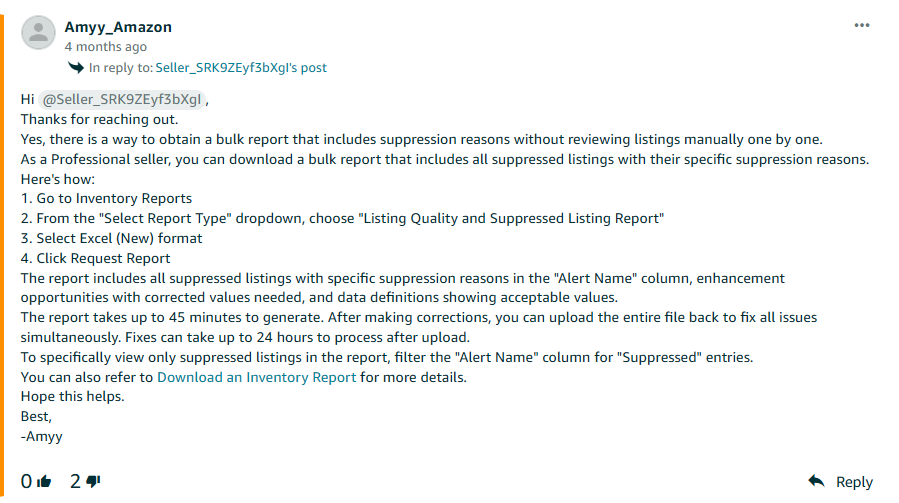
Source: Amazon
Step 3: Update the Required Information
Complete the required corrections based on Amazon’s instructions. Depending on the reason behind suppression, you may need to enter missing information, select values from the available drop-down menus, upload a compliant product image, or make other required updates.
After completing all required corrections, click Save to submit the changes.
| Point to Remember: If Amazon identifies multiple issues for the same ASIN, resolve all of them before submitting the listing. |
|---|
Step 4: Allow Amazon to Process the Update
After you submit the required changes, Amazon reviews the updated listing. If the identified issues have been resolved, the listing is no longer suppressed and becomes eligible to appear in Amazon Search.
Monitor the listing for at least 72 hours after submitting the changes. If it remains suppressed longer than that, review your submission status in the Manage Your Compliance dashboard or contact Seller Support.
| Note for Sellers: While resolving the suppression restores the listing’s search visibility, organic traffic, and ranking may take additional time to recover, particularly if the listing remained suppressed for an extended period. |
|---|
The Framework: How to Prevent Amazon Listing Suppression
1. Audit & Optimize Amazon Product Listings at Regular Intervals
Schedule regular listing audits to identify incomplete, outdated, or inaccurate information before it affects search visibility. During each audit:
- Review product titles, descriptions, and bullet points to ensure they comply with Amazon’s current content guidelines.
- Verify that all required and recommended attributes are covered for the product category.
- Confirm that product images continue meeting Amazon’s image requirements, including background, product coverage, and resolution.
- Check GTINs, brand information, pricing, and category classification to ensure they remain accurate and consistent across the listing.
- Update category-specific fields whenever Amazon revises its listing requirements.
2. Monitor Amazon Seller Central
Review Seller Central regularly before listing issues start affecting search visibility, conversions, or sales performance.
- Review the Activate Listings, Fix Your Products, and Listing Quality Dashboard to identify incomplete or non-compliant listings.
- Resolve listing suppressions promptly to minimize disruption to search visibility and sales.
3. Review Listings After Major Updates and Requirement Changes
Review existing and affected listings after making major changes to product content, category, product type, and attributes.
- After bulk uploads, check the processing report to confirm that the file did not return errors, remove required fields, overwrite valid attributes, or break parent-child variation relationships.
- If a product category or product type is changed, verify that all newly required attributes are complete and that the ASIN has not been flagged in Manage Inventory, Fix Your Products, the Listing Quality and Suppressed Listing Report, or Manage Your Compliance.
The Strategic Imperative: Amazon Account Health Management
As Amazon’s product listing requirements continue to evolve, preventing listing suppression requires a proactive rather than a reactive approach to maintain both account compliance and listing health.
Instead of resolving issues after a product loses search visibility, ongoing account health management emphasizes continuous monitoring, regular compliance audits, and timely corrective action. This approach helps sellers identify listing errors, resolve suppression risks quickly, and maintain uninterrupted product visibility.
The Next Steps: Sellers need to determine who should run catalog operations and account health management. The answer depends on team capacity, catalog complexity, SKU volume, budget, and Seller Central expertise. Brands with experienced in-house marketplace teams may manage this function internally. However, sellers with limited resources, large catalogs, or limited Seller Central expertise may benefit from outsourcing Amazon account management to specialists. Specialized teams bring field-level Seller Central expertise, category compliance knowledge, bulk upload discipline, and proven workflows, ensuring faster resolutions and cost-efficiency.
Author Bio
Sophie Hayes is an eCommerce consultant and a keen blogger, currently working at Team4eCom (Full-Service eCommerce Agency). With over 11 years of experience in the industry, she specializes in topics revolving around the eCommerce domain, such as online marketing, eCommerce PPC, store optimization, listing optimization, and product listing. Moreover, she has a great knowledge of the leading eCommerce platforms and marketplaces like Amazon, eBay, Walmart, Target, and others. She incorporates this understanding in her write-ups to help online retailers and businesses follow the best practices, take their business to new heights, and gain a grounded footing in the market.




 Measuring ROI Like a CFO

 Business Programs