Luxury SUVs are evolving rapidly, with the interplay of innovation, environmental consciousness, and personalized luxury shaping the next generation of these vehicles. Status and comfort remain at the core, but new expectations are taking center stage as the luxury SUV segment adapts to meet the unique demands of modern drivers. As automakers race to integrate the latest advances, understanding the trends set to dominate this arena will help buyers and enthusiasts prepare for a new standard of luxury. Learn More
The future of luxury SUVs is set to change dramatically with advancements in electric powertrains and AI, blending cutting-edge technology with eco-friendliness and customized luxury. Manufacturers focus on performance, sustainability, and user-centric features. Safer, autonomous systems make driving more relaxing, while personalized interiors with sustainable materials reflect a refined, responsible luxury suited to new affluent consumers. Digital features like connected services and intuitive interfaces are becoming standard, shaping the evolving luxury SUV experience.
Electrification: The New Standard
The presence of electric vehicles (EVs) in the luxury SUV category is now a defining trend. With increasingly ambitious global climate goals and regulatory requirements, manufacturers are dedicating substantial resources to electrification. Leading auto groups such as BMW plan to launch an impressive range of 25 EV models by 2025, including 12 fully electric models. This move not only underscores the push for reduced emissions but also responds to discerning buyers seeking eco-conscious alternatives that do not compromise on performance or prestige. The momentum behind plug-in hybrids and all-electric options signals that electrification will be a minimum standard rather than a niche offering in the luxury sector.
Autonomous Driving: Enhancing Safety and Convenience
The capability for semi-autonomous and fully autonomous driving represents another leap forward for luxury SUVs. Industry leaders such as Audi and Mercedes-Benz are integrating sophisticated advanced driver-assistance systems (ADAS) into their high-end models, making driver fatigue a thing of the past on long highway journeys. Features such as automated lane-keeping, adaptive cruise control, and even hands-free highway driving are increasingly available, marking a shift toward a more relaxed and secure travel experience. The focus on autonomous features also supports the broader automotive goal of minimizing accidents and improving road safety.
Customization and Personalization: Tailoring the Experience
Luxury now extends far beyond the badge on the grille or the materials in the cabin. The desire for unique experiences drives wealthy consumers to seek out bespoke options that go well beyond standard trim choices. Manufacturers such as Rolls-Royce are responding with unparalleled levels of customization, offering everything from exclusive paint formulations to custom embroidery, unique wheel designs, and technology suites tailored to individual preferences. This trend amplifies the allure of exclusivity, making each luxury SUV a personal expression of its owner, whether through aesthetic details or bespoke performance tuning. This rise in bespoke services is driving significant investment across the industry.
Digitalization and AI Integration: Transforming Interfaces
The rise of digitalization and artificial intelligence is revolutionizing how drivers interact with their vehicles. AI-powered digital assistants simplify everything from navigation to climate control, while advanced infotainment systems adapt to user habits and anticipate needs. Tesla and BMW are among the most aggressive adopters, embedding deep learning technology and conversational voice controls into their flagship models. Predictive maintenance alerts and adaptive user profiles are becoming increasingly common, enabling drivers to enjoy a more seamless, intuitive connection with their vehicles. This integration makes luxury SUVs not just smarter, but also more responsive and enjoyable to own.
Modern luxury increasingly emphasizes sustainability, driving a dramatic shift in interior design philosophies for top-tier SUVs. Cutting-edge materials such as vegan leathers, recycled ocean plastics, and mycelium mushroom-derived textiles are replacing traditional animal leathers and synthetics. These innovations deliver rich textures and visual appeal while reinforcing a brand’s commitment to responsible luxury. Consumers are now associating premium quality with environmental accountability, and luxury automakers are responding by making ethical sourcing and low-impact manufacturing central pillars of their product lines. These efforts not only reduce environmental impact but also attract buyers who value thoughtful, forward-thinking design.
Conclusion
The future of luxury SUVs is being shaped by electrification, autonomy, digital sophistication, and a renewed commitment to sustainability. These trends are converging to elevate the driving experience and align it with the values of a new, discerning audience. The luxury SUV market is set to undergo a fundamental transformation, where innovation and responsibility coexist with comfort and exclusivity. Staying ahead of these shifts will be essential for both industry insiders and consumers who expect nothing less than the cutting edge in their vehicles.
https://www.strategydriven.com/wp-content/uploads/IMG_1609.jpeg9141367StrategyDriven - Sponsored Contenthttps://www.strategydriven.com/wp-content/uploads/SDELogo5-300x70-300x70.pngStrategyDriven - Sponsored Content2026-04-03 20:53:132026-04-03 20:53:13Future Trends in Luxury SUVs: What to Expect in the Coming Years
Preventive maintenance isn’t just about keeping your home in good shape, it’s about reducing the risks that quietly build over time. From HVAC systems and plumbing to electrical components and pest control, small issues often develop unnoticed until they turn into expensive or dangerous problems. Understanding the benefits of preventive maintenance helps homeowners build a smarter maintenance strategy focused on long-term maintenance cost reduction and effective maintenance risk management.
Preventive Maintenance vs Reactive Maintenance
Preventive maintenance is about acting before something breaks, not after.
Preventive maintenance means handling issues while a system is still functioning, focusing on early signs like wear, buildup, inefficiency, reduced performance, minor leaks, or component strain and resolving them before they escalate. This approach is the foundation of both preventive maintenance and preventative maintenance practices.
Reactive maintenance waits for failure, the AC stops cooling, a pipe bursts, the panel trips, and then fixes it. By that point, the problem has usually expanded, affecting other components, increasing repair complexity, and often requiring urgent, higher-cost fixes.
A simple way to think about it:
Reactive means “Fix what failed”
Preventive means “Stop failure from ever happening”
The difference isn’t just timing, it’s impact. Reactive maintenance usually involves urgency, higher costs, and sometimes collateral damage, while preventive maintenance keeps problems small, predictable, and contained, which is one of the core benefits of preventive maintenance.
Why Preventive Maintenance Is About Maintenance Risk Management
Most homeowners think maintenance is about keeping things “nice.” In reality, it’s about maintenance risk management.
Every system in your home carries risk. HVAC can fail during extreme temperatures, plumbing can leak silently and cause structural damage, and electrical systems can create fire hazards.
Every home system operates under gradual wear, and failure is typically the result of accumulated stress rather than a single event. Preventive maintenance and preventative maintenance both focus on managing that progression.
It reduces the likelihood that a system will fail and the severity of consequences if it does, catching issues early and preventing small issues from escalating.
So it’s not just upkeep, it’s maintenance risk management. Instead of maintaining for appearance or routine, you’re actively reducing the chance of expensive, disruptive, or dangerous events, which directly supports long-term maintenance cost reduction.
The Home Risks Preventative Maintenance Helps You Avoid
Preventative maintenance targets risks that are expensive because they go unnoticed. These risks often develop quietly over time, including water damage from slow leaks or pressure issues, system breakdowns from prolonged strain, fire hazards from electrical faults or overheating components, air quality issues from dust buildup or mold, structural damage from ongoing moisture exposure, energy inefficiency from systems working under resistance, and pest infestations entering through unnoticed gaps.
The key pattern is that most major home issues start small and invisible. These risks typically begin as minor, localized problems and become costly only when left undetected, preventative maintenance makes them visible early and stops them before they escalate.
This is one of the clearest benefits of preventive maintenance, as it directly supports both maintenance risk management and maintenance cost reduction.
How HVAC Preventative Maintenance Reduces Breakdowns and Costs
HVAC systems rarely fail suddenly, they degrade first. HVAC systems experience continuous load, and small inefficiencies increase internal stress, as restricted airflow, dirty coils, or imbalanced operation force components to work harder and accelerate wear.
HVAC preventative maintenance catches restricted airflow, component wear, refrigerant issues, and dirty coils reducing efficiency, restoring proper operating conditions where air moves freely, heat exchange remains efficient, and components run within normal load ranges.
By fixing these early, the system doesn’t overwork itself, parts last longer, and energy consumption stays lower, reinforcing the benefits of preventive maintenance.
Without maintenance, small inefficiencies compound:
– more strain – more heat – faster wear – eventual failure
This reduces strain on critical parts, slows deterioration, and minimizes the chance of breakdown during peak demand, which is why HVAC preventative maintenance plays a key role in any maintenance strategy focused on maintenance cost reduction.
How Plumbing Preventive Maintenance Helps Avoid Water Damage
Water damage is one of the most expensive home issues, and it’s often silent until it’s severe.
Plumbing issues often develop gradually, with small leaks, worn seals, or pressure imbalances spreading moisture over time.
Preventive maintenance in plumbing focuses on identifying slow leaks, weak connection points, drain blockages, and excessive water pressure, keeping drains clear, checking seals, joints, and connections, and monitoring pressure (too high means pipe stress).
A $5 seal or a minor leak, if ignored, can turn into mold remediation, drywall replacement, flooring damage, and structural repairs.
By resolving these early, preventive maintenance limits how far water can travel and how long it remains undetected, preventing secondary damage such as mold growth, material deterioration, and structural weakening, all contributing to maintenance cost reduction and stronger maintenance risk management.
Why Electrical Maintenance Is Critical for Home Safety Risks
Electrical issues don’t usually give obvious warnings, they build quietly. Electrical systems can degrade without visible signs, as loose connections, aging components, or overloaded circuits generate heat and instability long before failure becomes obvious.
Preventive maintenance and preventative maintenance approaches address loose connections, circuit overloads, aging panels or wiring, and faulty breakers, ensuring secure connections, proper load distribution, and functional protective devices.
These aren’t just “performance” issues, they’re safety risks. Electrical failures can lead to fire hazards, equipment damage, and power instability.
Because electrical issues can escalate directly into high-impact events that are both dangerous and expensive, early detection is essential. This is where maintenance risk management becomes critical within any maintenance strategy.
How Pest and Pool Care Prevent Health and Property Risks
These are often overlooked as “optional,” but they’re actually risk systems.
Pest control limits access and eliminates conditions that allow infestations to establish, protecting both structural elements and indoor hygiene. Preventative maintenance in pest control stops infestations before they spread, prevents structural damage, and reduces contamination risks.
Pool care and routine pool cleaning maintain balanced water chemistry and clean circulation, preventing bacteria growth, equipment damage, and surface deterioration.
Both work the same way as HVAC preventative maintenance or plumbing preventive maintenance: small imbalance – ignored – system failure (health or property impact).
Both systems maintain controlled environments that prevent harmful conditions from developing, supporting an overall maintenance strategy built around preventive maintenance and maintenance risk management.
How Preventive Maintenance Drives Maintenance Cost Reduction
Preventive maintenance doesn’t just “save money”, it drives maintenance cost reduction by shifting how money is spent.
Instead of large, unexpected repair bills, emergency service premiums, and early system replacements, expenses become smaller, more consistent, and easier to plan over time.
Over time, the math is simple:
Preventive means many small, predictable costs
Reactive means fewer but much larger, unpredictable costs
And those large costs usually come with added damage and urgency.
Preventive maintenance reduces the accumulation of damage within systems. Small interventions prevent larger failures that require extensive repairs or full replacements, leading to fewer emergency service calls, reduced repair scope, extended equipment lifespan, and lower operating costs due to maintained efficiency, all key benefits of preventive maintenance.
What a Smart Preventative Maintenance Strategy Looks Like
A smart maintenance strategy isn’t about doing everything, it’s about prioritizing risk.
Focus first on systems with the highest damage potential: HVAC, plumbing, and electrical. These have the highest failure cost and should be the priority in any preventive maintenance or preventative maintenance plan.
Maintain a simple, consistent cadence for inspections and servicing: monthly checks like filters and visual inspections, quarterly attention to drains, airflow, and basic system performance, and annual professional servicing.
Monitor performance changes, not just scheduled tasks, especially in systems like HVAC where furnace maintenance plays a key role.. Unusual sounds, shifts in performance, higher energy bills, or minor leaks and odors are early signals that something is off.
Think in systems, not isolated fixes. Poor airflow increases HVAC strain, water issues impact structure and air quality, and electrical problems affect appliances.
Address minor issues immediately rather than postponing. Effective preventive maintenance is structured around preventing escalation, identifying where small issues can grow quickly and managing those areas proactively through a well-defined maintenance strategy.
You don’t need a perfect home, you need a controlled-risk home supported by preventive maintenance, strong maintenance risk management, and consistent maintenance cost reduction.
The 9 Best Personal-Assistant Recruitment Agencies in Los Angeles
Los Angeles is one of the toughest markets for personal-assistant talent. Hollywood A-listers, crypto founders in Venice, and multigenerational family offices from Beverly Hills to Malibu now compete for roughly 300 career PAs citywide. A 2025 luxury-staffing report calls the hiring scene “hotter than ever,” noting that principals pay 10–15 percent more than 2023 rates to secure the right person. When an assistant can reclaim hours of your day, protect your privacy, and keep every moving part in sync, settling for average isn’t an option.
We audited more than 20 recruiting firms, scored each against seven objective criteria, and surfaced the nine agencies most likely to deliver a PA who fits your world.
Our Research & Methodology
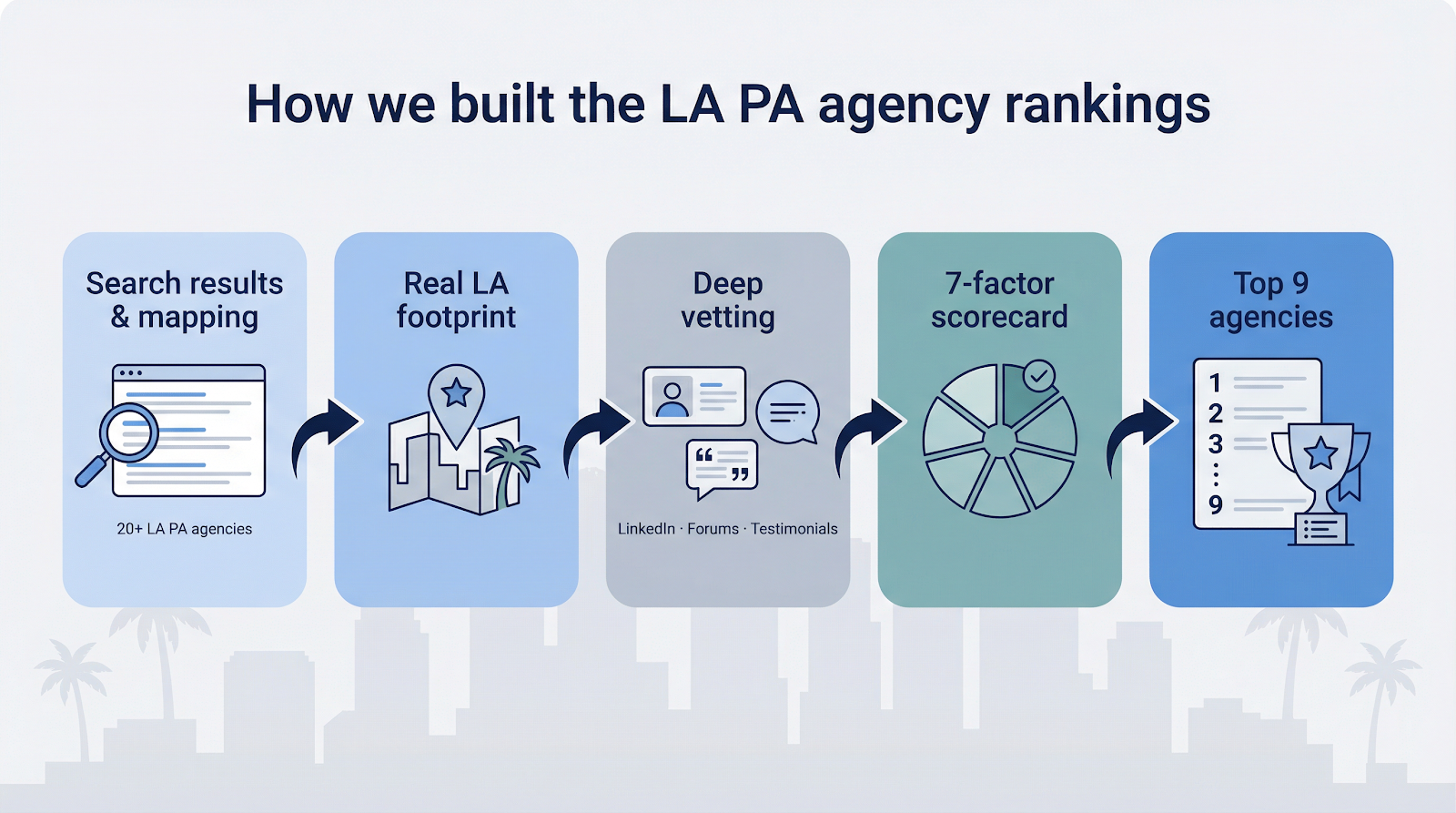
Before ranking a single agency, we handled the project like a mini-market study. We opened more than 20 search results for “personal assistant agency Los Angeles” and related terms, then mapped every company that showed a real footprint in the city.
Next, we moved past homepage headlines. We combed LinkedIn for placement histories, scanned Reddit and Quora threads for unfiltered client stories, and read every testimonial we could verify. That gave us a pulse on what busy Angelenos value: speed, discretion, and crystal-clear fees.
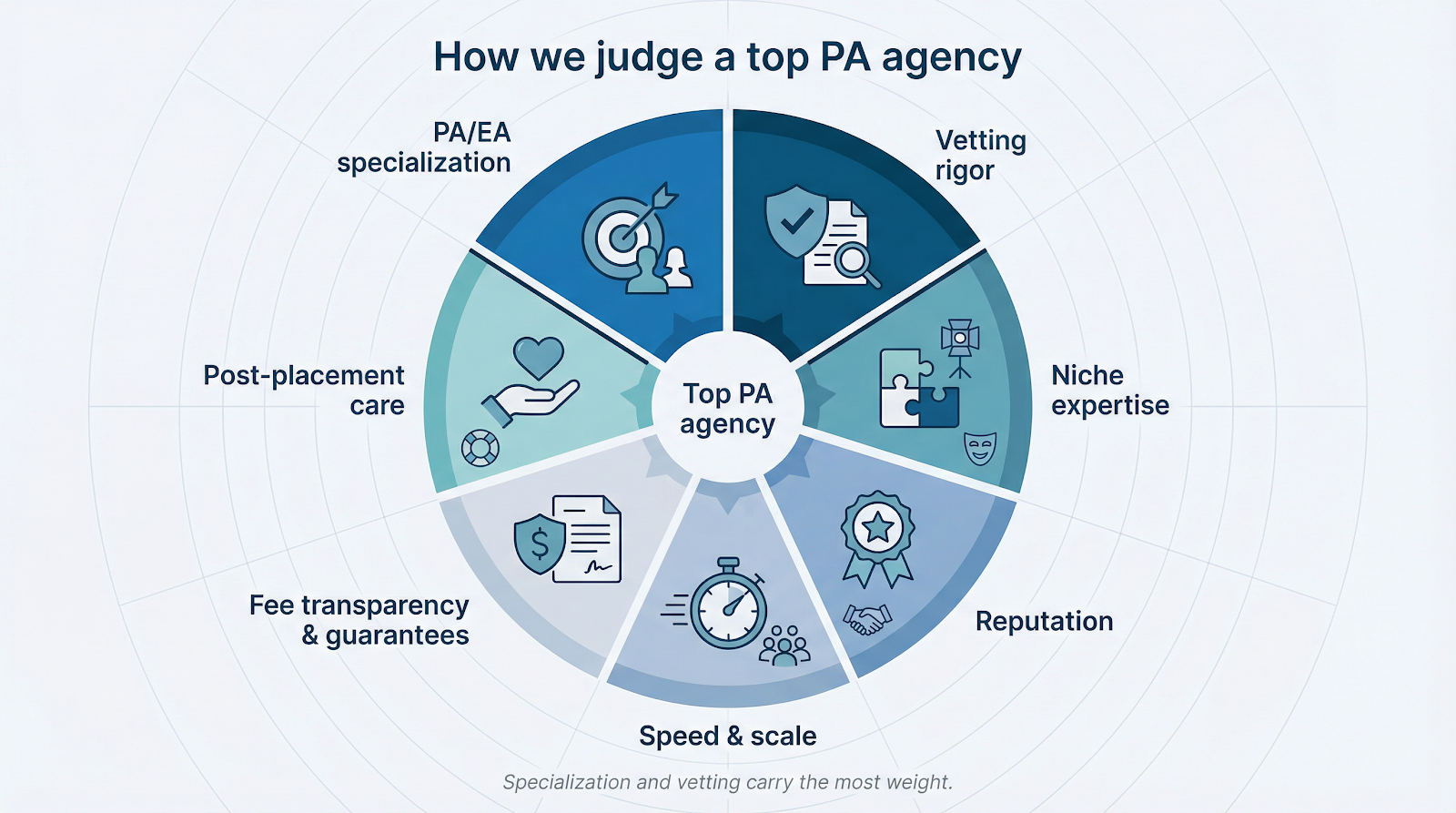
From there we built a seven-factor scorecard. Two criteria carry the most weight: depth of PA specialization and the rigor behind each firm’s candidate checks. Reputation signals, niche expertise, fill speed, fee transparency, and post-placement support round out the model.
Finally, we assigned provisional scores, cross-checked them against third-party press mentions, and debated edge cases until the top nine separated from the pack. The result is a ranked list you can trust, with a clear paper trail if you ever want to review our logic.
How We Judge a “Top” PA Agency
Choosing a personal-assistant recruiter is not about glossy websites or celebrity name drops. It comes down to proven systems that deliver the right human into your life without drama. We scored every firm against seven concrete factors, weighted to mirror what LA employers say matters most.
First comes specialization. Agencies that focus on PA and EA searches sit at the top because they nurture deeper talent pools and instinctively speak the shorthand of the role.
Second is vetting rigor. We looked for multi-layer background checks, reference calls that go beyond “Was she on time?” and interview processes designed to spot discretion as well as skill. A résumé means little if your assistant cannot keep a secret.
Third, we reward niche expertise. An agency fluent in studio politics or family-office etiquette will land better cultural matches than a generalist temp shop.
Reputation follows. Decades in business, repeat clients, and third-party press nods all signal consistency no one can fake overnight.
Speed and scale matter too. When your calendar spills over, you need qualified options in days, not months. Agencies with large candidate benches and tight internal workflows scored higher.
We also credit fee transparency and solid replacement guarantees. Surprise invoices erode trust; straightforward terms build it.
Last is post-placement care. The best recruiters stay involved after day one, smoothing onboarding and catching small issues before they grow.
Weighting these factors keeps our rankings objective and focused on what delivers real value to you.
Top Personal Assistant Agencies in Los Angeles
1. C-suite Assistants: Nationwide Reach With Local Firepower
C-suite Assistants blends corporate polish with Hollywood agility. Backed by a nationwide database that has recently placed a personal assistant to a pop star and an executive assistant to a global-media CEO, the firm now serves as a Los Angeles personal assistant recruitment agency able to deliver fully vetted finalists in days—not weeks. Because its recruiters source nationally, they can present qualified candidates within one to two weeks—far faster than the typical month. Every contender passes multi-round interviews, reference checks, and confidentiality screens before a résumé reaches your inbox. A 90-day replacement guarantee protects the hire if something misaligns. When you need a partner who understands board meetings at noon and a red-carpet call time at six, C-suite is the number to dial.
2. The Grapevine Agency: Hollywood’s trusted matchmaker
Ask on any studio lot for an assistant recommendation, and Grapevine surfaces first. Founded by two former entertainment assistants, the boutique firm has spent 20 years pairing Oscar winners, showrunners, and high-net-worth families with PAs who thrive under studio spotlights. Recruiters speak the unwritten rules of set life, from thick NDAs to last-second jet reroutes, leading to near-zero gossip leaks. Expect three or four handpicked finalists, each vetted for 24-hour availability and absolute discretion. If your world revolves around premieres and production schedules, Grapevine already knows the script.
3. The Help Company: Four Decades of Discreet Excellence
Since 1982, The Help Company has staffed the homes and offices of film legends, fashion icons, and philanthropists. Recruiters often visit a client’s home to absorb the environment, then interview candidates in person to gauge everything from posture to table manners. Only a handful advance, and each signs a confidentiality pledge. The agency favors career PAs who understand nonstop schedules and international travel. Many clients return for every household hire, a sign of trust built over 40 years.
4. Pocketbook Agency: Modern Matchmaking at Startup Speed
Launched in 2014 by two former executive assistants, Pocketbook uses data and a 400-thousand-person network to surface talent quickly. Speed never sacrifices fit: detailed interviews probe mindset as much as skills because emotional intelligence often outweighs typing speed. Blending tech and entertainment, Pocketbook excels at hybrid roles—EA in the morning stand-up, PA by the evening red-carpet rehearsal. Contingency fees sit at roughly 20 percent, with clear salary guidance before you sign.
For more than 20 years, Rose’s Agency has specialized in high-profile domestic staffing. The founder still interviews every candidate, filtering out the merely competent in favor of the exceptional. Many placements combine duties—house manager, event planner, family quarterback—so candidates field etiquette questions, vendor scenarios, and crisis drills before meeting a client. Straightforward fees and candid advice make the boutique process transparent.
6. The Celebrity Personal Assistant Network: When Only a Unicorn Will Do
Consultant Brian Daniel conducts retained searches for principals who demand the world’s best assistants. Clients pay up front for exclusivity, and Daniel taps a global contact list built during his own years as a celebrity PA. Roles often require 24-hour reachability, multiple languages, and seamless transitions from a G650 cabin to a five-star hotel lobby. Fees exceed contingency models, but clients pay for certainty that a six-figure assistant will endure.
7. Staffing at Tiffanie’s: Family Focused, Hollywood Savvy
Founded in 1998, Staffing at Tiffanie’s wins over families who need a PA that shifts from budget forecasts to ballet pickups without missing a beat. Discovery calls cover lifestyle details—diet, pet care, holiday traditions—so the assistant feels like part of the household on day one. Scenario questions test judgment in real family chaos, such as juggling three school calendars. Warmth pairs with professional rigor throughout the process.
8. The Middle: Part-time Assistants, Full-time Relief
Not everyone needs 40 hours of help. The Middle matches professionals with assistants who work five to 20 hours weekly and can scale with your life. Clients outline the tasks and hours, pay an all-inclusive hourly rate, and tap a roster of experienced pros. Many assistants are career EAs seeking flexibility, actors between shoots, or retired chiefs of staff who miss the action but not the grind. For founders in early funding rounds or parents needing seasonal support, The Middle delivers horsepower without full-time overhead.
9. Colonial Domestic Agency: Six Decades, Thousands of Placements
Opened in 1963, Colonial Domestic Agency maintains a database that spans generations of household staff. Recent postings list $50 per hour plus benefits for PAs willing to manage construction during the day and red-carpet wardrobes at night. Screening stays old school—phone interviews, reference letters, and in-person meetings at the Wilshire office—but the hands-on touch produces hires that last years. Advisers also walk new employers through California labor rules to prevent missteps.
Los Angeles Personal-assistant Salary and Hiring Trends
1. Salary Snapshot
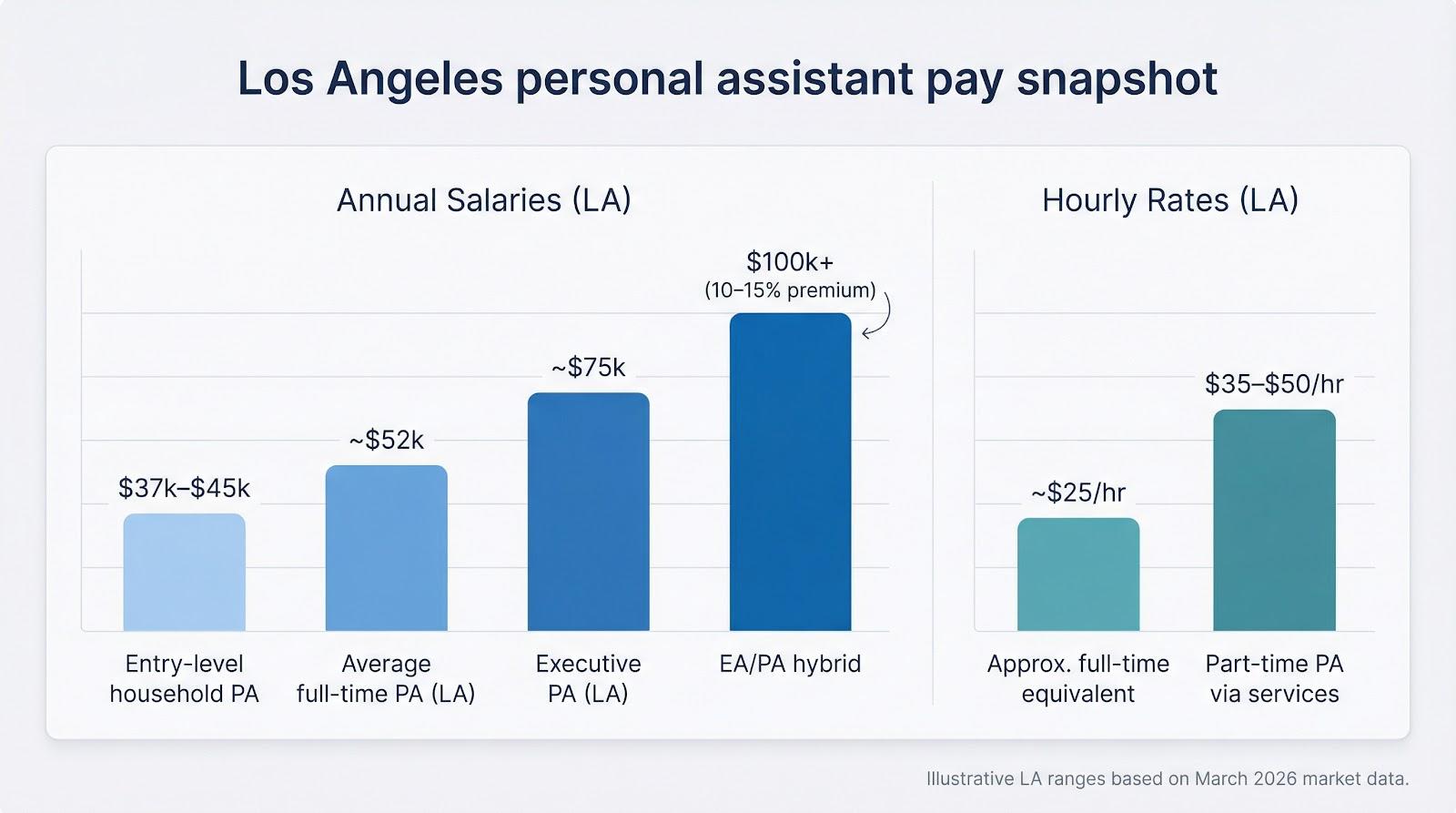
Let’s start with the question everyone asks: what should you pay? ZipRecruiter’s March 2026 data puts the average total compensation for a full-time personal assistant in Los Angeles at about $52,000 a year, or roughly $25 an hour. That figure sits above the national average, reflecting the city’s cost of living and the premium on confidentiality and round-the-clock flexibility.
The range widens quickly. Entry-level household PAs land between $37,000 and $45,000, while experienced executive–personal hybrids often clear six figures. ZipRecruiter lists an average of about $75,000 for executive personal assistants in LA, showing how scope, industry, and after-hours demands drive pay more than titles.
Part-time help costs $35–$50 an hour through services such as The Middle. At 10–20 hours a week, expect an annual spend of $18,000–$50,000, ideal for founders or families who need support without a constant shadow.
Keep these benchmarks handy as we explore demand drivers and legal costs.
2. Why Demand Keeps Rising
Money talks, but scarcity shouts. Ultra-wealthy families and high-growth startups are expanding faster than the assistant talent pool, creating a seller’s market for top PAs. A 2025 luxury-staffing report notes that private households in LA, New York, and London are “hotter than ever,” with principals offering higher salaries, annual bonuses, and even housing stipends to win candidates.
Because demand outpaces supply, skilled assistants field multiple offers within days. For you, that means two imperatives: move quickly once you find a fit and sweeten the offer with perks that show respect, such as overtime pay, upgraded travel, or a development budget.
Agencies on our list confirm the trend. Many now brief clients to expect a 10–15 percent premium over 2023 rates for an EA/PA hybrid who can handle board decks at breakfast and wardrobe pulls by dinner. Secure the right person and you reclaim hours, lower stress, and project professionalism across every touchpoint.
3. California Labor Rules Employers Overlook
Budgeting ends when the law begins. California treats most personal assistants as standard domestic employees, so overtime starts after eight hours in a day or 40 hours in a week. Unlike “personal attendants” such as caregivers, PAs qualify for time-and-a-half beyond that limit.
Classifying a PA as a 1099 contractor rarely passes muster. Under AB5, directing their work, setting their hours, and relying on them regularly makes the role a W-2 employee in almost every scenario. Penalties for misclassification dwarf any short-term savings, and reputable agencies will not bend that rule.
Practical takeaway: account for overtime and payroll taxes from day one. Some employers choose a higher flat salary to absorb expected overages; others keep the role hourly and pay the premium when weeks run long. Clear terms prevent awkward money talks and protect you from compliance headaches.
4. The Rise of EA/PA Hybrids
In LA, personal and professional spheres collide hourly, so many principals now prefer one trusted gatekeeper for both worlds. Enter the executive–personal assistant hybrid. These professionals can prepare a board deck at 9 am, renegotiate a Bel-Air catering contract at noon, and confirm a vet visit before sunset.
Because the role spans corporate and domestic duties, agencies report that hybrid jobs command a 10–15 percent premium over traditional executive-assistant posts. The payoff for employers is seamless coordination: one calendar, one inbox, and one person who sees every moving part and prevents collisions.
For assistants, the role offers range and reward. Hybrids gain C-suite insight plus household management skills that can lead to chief-of-staff or estate-manager careers. That cycle drives salaries higher and shortens hiring timelines, so decide early whether you need pure corporate support or an all-terrain fixer.
Quick-compare Cheat Sheet
Nine detailed blurbs help, yet sometimes you want the essentials in one glance. The table below lists each agency’s founding year, core niche, fee model, guarantee, and our overall score for quick comparison.
Agency
Founded
Primary niche
Typical fee
Replacement guarantee
Our score*
C-suite Assistants
2004
Hybrid corporate + private PAs
about 20 percent contingency
90 days
9.5
The Grapevine Agency
2005
Entertainment / celebrity
about 20 percent contingency
90 days
9.0
The Help Company
1982
UHNW households
about 25 percent, some retainers
Custom
9.0
Pocketbook Agency
2014
Startup + influencer support
about 20 percent contingency
90 days
8.8
Rose’s Agency
1988
High-profile domestic roles
about 20 percent contingency
90 days
8.5
Celebrity PA Network
2007
Global elite retained search
about 30 percent retained
Case by case
8.3
Staffing at Tiffanie’s
1998
Family-focused VIP staffing
about 20 percent contingency
90 days
8.2
The Middle
2019
Part-time / fractional PAs
Hourly model
Ongoing
8.0
Colonial Domestic Agency
1963
Legacy domestic staffing
about 20 percent contingency
90 days
8.0
*Scores follow the seven-factor rubric described earlier.
Use this grid to map options to your priorities. If speed and national reach top the list, C-suite leads. For pure Hollywood expertise, Grapevine or Help Company excel. Need part-time flexibility? The Middle stands out. Match the data to your needs and you are halfway to clearing your inbox.
Frequently Asked Questions
1. How long does it take to hire a PA through an agency?
Give clear feedback fast, and most agencies can present finalists within two weeks. C-suite and Pocketbook often meet that mark because they keep a ready bench of vetted talent. Add one to two weeks for interviews, background checks, and paperwork. Delay your feedback and the same candidate may accept another offer the next day.
2. Who pays the agency fee?
The employer does. Budget around 20 percent of the first-year salary for contingency searches and closer to 30 percent for retained, ultra-niche hunts. The fee is a single payment that covers sourcing, screening, and a replacement guarantee if the match falters early.
3. Can I ask my PA to sign a nondisclosure agreement?
Yes, and every agency here recommends it. An NDA protects personal data, business details, and even household routines from outside chatter. Most firms provide template language, but have your attorney review final wording.
4. What perks keep top assistants loyal?
Pay matters, yet culture retains them. Predictable overtime, a clear path for raises, and respect for off-hours when emergencies are not in play all help. Many high performers also value development perks such as conference passes or software courses.
For pure digital tasks, yes. Services like Belay or Boldly can manage calendars, inboxes, and travel booking remotely for about 40 dollars an hour. They cannot pick up couture on Melrose or stand in for you at a site visit. If your needs cross the digital-physical divide, an in-person PA—or a hybrid approach—delivers better coverage.
Key takeaways
Los Angeles runs on behind-the-scenes talent, and personal assistants are the gearbox that keeps influential lives turning smoothly. Demand is hotter than finance charts, salaries reflect that heat, and the legal landscape rewards those who plan ahead.
Choose an agency aligned with your world—Hollywood buzz, tech growth, family harmony, or fractional flexibility—and let its network shorten the search. Pay market rates, follow overtime rules, and sweeten the package with growth perks to secure loyalty that pays for itself in saved time and reduced stress.
Use this guide as your roadmap. Skim the table, revisit the agency blurbs that fit, and schedule discovery calls this week. The sooner you secure a trusted right hand, the sooner you return to the work only you can do.
https://www.strategydriven.com/wp-content/uploads/word-image-225889-1.jpeg8931600StrategyDriven - Sponsored Contenthttps://www.strategydriven.com/wp-content/uploads/SDELogo5-300x70-300x70.pngStrategyDriven - Sponsored Content2026-04-03 20:22:382026-04-03 20:22:38Best Personal Assistant Agencies LA: Top 9 Recruiters Compared
Affiliate platforms have become a major force in digital commerce, connecting brands with publishers, influencers, and marketing partners who help drive traffic and conversions. As these platforms grow, they must manage increasing volumes of data, transactions, and user interactions. Scaling successfully isn’t just about expanding reach or improving performance; it also requires robust security measures that protect both the platform and the ecosystem of partners that rely on it.
Secure infrastructure plays a central role in enabling affiliate platforms to grow with confidence. By prioritizing safety, resilience, and reliability, businesses can build scalable systems that support long-term success without compromising trust or operational stability.
The Unique Challenges of Scaling Affiliate Platforms
Affiliate platforms operate in complex digital environments. Unlike traditional websites or eCommerce stores, they often serve as intermediaries that manage partnerships, track conversions, and handle sensitive information such as payment details and campaign data.
As affiliate networks expand, the number of endpoints, integrations, and user accounts grows rapidly. This expansion increases the attack surface for potential cyber threats. Without a secure foundation, growth can introduce vulnerabilities that lead to data breaches, downtime, or financial loss.
Scaling also involves managing fluctuating traffic levels. Promotional campaigns, viral content, and seasonal demand can all cause sudden spikes in usage. Secure infrastructure ensures that platforms can handle these surges without exposing themselves to risks such as distributed denial-of-service attacks or unauthorized access attempts.
By addressing these challenges proactively, affiliate platforms can create a stable environment that supports sustainable growth.
Why Security Is a Growth Enabler, Not a Barrier
Some organizations view security as an obstacle to rapid expansion. In reality, it’s one of the most important enablers of scalable success. When affiliate platforms invest in secure infrastructure, they create systems that can adapt to increased demand without sacrificing performance or user trust.
Security measures such as encryption, authentication protocols, and network segmentation protect critical resources from unauthorized access. These protections allow teams to focus on innovation and partnership development instead of constantly responding to security incidents.
Furthermore, a secure platform attracts higher-quality partners. Brands and publishers are more likely to collaborate with networks that demonstrate a commitment to protecting data and maintaining operational integrity. In this way, strong security becomes a competitive advantage that supports long-term expansion.
Protecting Sensitive Data Across the Affiliate Ecosystem
Affiliate platforms handle a wide range of sensitive information. This may include personal details of users, financial data related to commissions, campaign analytics, and proprietary marketing strategies. Protecting this information is essential for maintaining credibility and regulatory compliance.
Secure infrastructure helps ensure that data is stored, processed, and transmitted safely. Encryption protocols safeguard information during transfer, while access controls limit exposure to authorized users only. Regular monitoring and auditing further reduce the likelihood of unauthorized activity going unnoticed.
As platforms scale, data flows become more complex. Secure infrastructure provides the tools needed to manage these flows efficiently, reducing the risk of accidental leaks or intentional breaches. By maintaining strong data protection practices, affiliate networks can build lasting relationships with partners and customers alike.
Building Trust Through Reliable Performance
Trust is a cornerstone of affiliate marketing. Publishers rely on accurate tracking systems to ensure they’re compensated fairly for their efforts. Advertisers depend on platforms to deliver consistent results and protect their brand reputation.
Secure infrastructure contributes to reliable performance by minimizing disruptions caused by cyber threats or system failures. Load balancing, redundancy, and automated threat detection all help maintain uptime during periods of high demand.
When affiliate platforms can guarantee consistent service, they reinforce confidence among stakeholders. This trust encourages more partnerships and greater investment, fueling continued growth.
Managing Compliance in a Global Marketplace
Affiliate platforms often operate across multiple jurisdictions, each with its own data protection and privacy regulations. Compliance with these requirements is essential for avoiding legal penalties and maintaining a positive reputation.
Secure infrastructure simplifies compliance efforts by incorporating features such as data classification, secure storage, and activity logging. These capabilities enable organizations to demonstrate accountability and transparency in their operations.
As platforms expand into new markets, scalable security frameworks allow them to adapt quickly to changing regulatory landscapes. This flexibility ensures that growth initiatives don’t outpace the organization’s ability to meet legal obligations.
Strengthening Network Security for Expanding Operations
Network security is a critical component of secure infrastructure. As affiliate platforms integrate with third-party tools, payment systems, and marketing technologies, the complexity of their networks increases.
Advanced firewall solutions, intrusion prevention systems, and traffic monitoring tools help safeguard network environments from malicious activity. For example, enterprise-grade solutions such as M Series Firewalls provide scalable protection that supports high-volume traffic and complex connectivity requirements.
By implementing robust network defenses, affiliate platforms can scale confidently while maintaining visibility and control over their digital ecosystems.
Preventing Fraud and Protecting Revenue Streams
Fraud is a persistent concern in affiliate marketing. Click fraud, fake leads, and unauthorized promotional activities can undermine campaign effectiveness and erode trust between partners.
Secure infrastructure helps detect and prevent fraudulent behavior through advanced analytics and real-time monitoring. Machine learning algorithms can identify unusual patterns in traffic or conversion data, enabling platforms to take corrective action before significant losses occur.
Scalable security systems also support the integration of verification processes, such as multi-factor authentication and behavioral analysis. These measures ensure that only legitimate users can access critical resources, reducing the likelihood of revenue leakage or reputational damage.
Supporting Seamless Integration With Third-Party Tools
Affiliate platforms rely on a wide range of third-party tools, including analytics platforms, content management systems, and advertising networks. These integrations enhance functionality but can also introduce security risks if not managed carefully.
Secure infrastructure enables safe integration by establishing standardized protocols for data exchange and authentication. Application programming interfaces can be protected with encryption and token-based access controls, ensuring that sensitive information remains secure during interactions with external systems.
As platforms scale, the ability to onboard new partners and technologies quickly becomes a strategic advantage. A secure foundation makes it possible to expand capabilities without compromising stability or performance.
Enhancing Scalability Through Cloud Security Strategies
Cloud computing has become a popular choice for affiliate platforms seeking flexible and cost-effective infrastructure. However, scaling in the cloud requires careful attention to security considerations.
Secure infrastructure in cloud environments involves implementing best practices such as identity management, network isolation, and continuous monitoring. Automated security updates and configuration management tools help maintain consistent protection across distributed systems.
By adopting a cloud-first security strategy, affiliate platforms can respond to growth opportunities with agility. They can allocate resources dynamically, manage peak demand efficiently, and maintain strong defenses against evolving threats.
Reducing Downtime With Proactive Risk Management
Downtime can have significant financial and reputational consequences for affiliate platforms. Missed conversions, delayed payouts, and disrupted campaigns all undermine stakeholder confidence.
Secure infrastructure reduces downtime by incorporating proactive risk management measures. Regular vulnerability assessments, patch management processes, and disaster recovery planning help organizations prepare for potential disruptions.
Redundant systems and failover mechanisms ensure that services remain available even in the event of hardware failures or cyber incidents. This resilience supports uninterrupted operations as platforms scale to accommodate larger audiences and more complex campaigns.
Empowering Teams With Security Awareness and Training
Technology alone can’t guarantee secure scaling. Human factors play a crucial role in maintaining a safe digital environment. Employees, partners, and affiliates must understand their responsibilities in protecting sensitive information and following best practices.
Secure infrastructure initiatives often include training programs that educate stakeholders about phishing risks, password management, and secure communication protocols. By fostering a culture of security awareness, affiliate platforms can reduce the likelihood of accidental breaches or insider threats.
As teams grow alongside the platform, ongoing education ensures that security practices remain consistent and effective across all levels of the organization.
Leveraging Data Insights to Improve Security Posture
Data analytics isn’t only valuable for optimizing marketing performance; it also plays a vital role in strengthening security strategies. By analyzing system logs, user behavior, and network activity, affiliate platforms can identify emerging threats and refine their defenses.
Secure infrastructure supports the collection and analysis of relevant data in real time. This visibility enables organizations to respond quickly to anomalies and implement targeted improvements.
Over time, these insights contribute to a more adaptive security posture that evolves alongside the platform’s growth trajectory.
Future-Proofing Affiliate Platforms With Scalable Security Architecture
The digital landscape is constantly changing. New technologies, regulatory requirements, and cyber threats continue to reshape the way affiliate platforms operate. To remain competitive, organizations must adopt security architectures that are both robust and adaptable.
Future-proof infrastructure emphasizes modular design, allowing security components to be updated or expanded without disrupting core operations. This flexibility ensures that platforms can integrate new features, enter new markets, and support emerging partnership models while maintaining strong protections.
By investing in scalable security architecture today, affiliate networks can position themselves for sustained growth and innovation in the years ahead.
Balancing User Experience With Strong Protection
One of the key challenges in secure scaling is maintaining a seamless user experience. Overly restrictive security measures can frustrate partners and reduce engagement. On the other hand, insufficient protection can expose the platform to serious risks.
Secure infrastructure helps strike the right balance by implementing intelligent authentication systems and streamlined access controls. Single sign-on capabilities, adaptive security measures, and automated threat detection all contribute to a smooth yet secure experience.
When users feel confident that their interactions are both convenient and safe, they’re more likely to remain active participants in the affiliate ecosystem.
Creating a Competitive Advantage Through Security Leadership
In a crowded affiliate marketplace, differentiation is essential. Platforms that demonstrate leadership in security can stand out as trusted partners for brands and publishers alike.
Transparent communication about security practices, regular performance reporting, and proactive risk management initiatives all contribute to a positive reputation. As word spreads about a platform’s reliability and integrity, new opportunities for collaboration and expansion naturally follow.
Secure infrastructure is therefore not just a technical requirement; it’s a strategic asset that supports brand positioning and long-term success.
Strengthening Partner Relationships Through Secure Collaboration
As affiliate platforms grow, the number of stakeholders involved in daily operations increases significantly. Advertisers, publishers, agencies, and technology providers all rely on the platform’s infrastructure to communicate, share campaign assets, and access performance data. Secure collaboration environments help ensure that these interactions remain efficient and protected.
Role-based access controls are especially valuable in this context. By assigning permissions according to specific responsibilities, platforms can prevent unauthorized exposure of sensitive information while still enabling partners to carry out their work effectively. For example, a publisher may need access to campaign tracking dashboards but not financial reporting tools, while an advertiser may require broader oversight of performance metrics. Establishing these boundaries through secure infrastructure reduces risk and simplifies governance as the ecosystem expands.
Secure file-sharing solutions and encrypted communication channels also play an important role in strengthening collaboration. Affiliate campaigns often involve the exchange of creative materials, promotional guidelines, and confidential performance insights. Protecting these resources from interception or misuse reinforces trust and supports smoother working relationships between all parties involved.
Maintaining Platform Integrity During Rapid Growth
Rapid scaling can place pressure on internal processes as well as technical systems. When new partners are onboarded quickly or campaigns are launched at high speed, there’s a greater risk of configuration errors or overlooked vulnerabilities. Secure infrastructure provides structured workflows that help maintain platform integrity during these periods of accelerated growth.
Automated onboarding procedures, standardized security checks, and centralized management dashboards enable teams to expand operations without losing oversight. This structured approach ensures that every new integration or partnership meets established security standards before going live. As a result, affiliate platforms can pursue ambitious growth strategies while maintaining a stable and resilient foundation.
In addition, maintaining clear documentation and consistent security policies helps organizations respond effectively to unexpected challenges. Whether dealing with emerging cyber threats or operational disruptions, having well-defined protocols in place allows teams to act quickly and confidently, preserving both performance and reputation.
Conclusion
Scaling an affiliate platform is an exciting journey that brings new opportunities for growth, innovation, and collaboration. However, this expansion must be supported by secure infrastructure that protects data, ensures reliable performance, and builds trust across the ecosystem.
By prioritizing network defenses, compliance strategies, cloud security practices, and proactive risk management, organizations can create scalable systems that enable safe and sustainable growth. Secure infrastructure empowers affiliate platforms to navigate the complexities of the digital landscape with confidence, unlocking their full potential while safeguarding the interests of partners and users alike.
Have you ever looked at a perfectly cut piece of metal or stone and wondered how it stays so clean at the edges? No burns, no cracks, just smooth precision. That’s not easy to achieve with traditional cutting methods. Precision manufacturing today is less about force and more about control, especially when materials are expensive or sensitive.
Industries are slowly shifting toward smarter processes that reduce waste and improve output quality. In fact, studies show advanced manufacturing methods can improve overall efficiency by about 10% and energy efficiency by up to 25%. That’s a noticeable difference in real production environments.
Somewhere in this shift, waterjet technology has found its place, not loudly, but effectively, helping manufacturers cut with accuracy while keeping materials intact.
1. No Heat Means No Damage
Most cutting methods rely on heat, and while that might seem efficient, it often creates problems you don’t notice right away. Materials can bend slightly, lose their original strength, or develop burn marks along the edges. These small changes can affect how the final product performs.
Waterjet machines take a different approach. They use a high-pressure stream of water, often mixed with fine abrasive particles, to cut through materials without generating heat. Because of this, the material remains unchanged during the process. There’s no warping, no weakening, and no hidden damage beneath the surface.
That’s exactly why industries that require high precision prefer this method, it keeps the material as reliable as it was before cutting.
2. Works on Almost Any Material
One of the most practical reasons manufacturers lean toward this technology is its flexibility. Instead of switching between different machines for different materials, the same setup can handle a wide range without much adjustment. It can cut through:
Steel and aluminum
Glass and ceramics
Marble and stone
Plastics and composites
When you look at how a waterjet machine manages both hard and delicate materials with the same level of control, it starts to feel less like a specialized tool and more like an all-rounder.
In many industry discussions, OMAX Corp, a Hypertherm Company is often mentioned when people talk about maintaining consistent results across different materials. It usually comes up when manufacturers compare real-world performance, not just technical specs on paper.
3. Extremely High Precision
Precision isn’t just about getting one perfect cut. It’s about repeating that same accuracy every single time without variation. Waterjet machines are known for handling fine details with very tight tolerances, which means edges come out clean, dimensions stay exact, and results remain consistent across multiple parts.
This becomes critical in industries like aerospace or medical manufacturing, where even a minor deviation can lead to serious problems. There’s very little room for error in those environments. What makes waterjet technology stand out is its ability to maintain that level of control without added complexity. It delivers steady, reliable results that manufacturers can depend on daily.
4. Less Material Waste
Every cutting process creates some waste, but the amount can vary a lot depending on the method used. That’s where waterjet technology makes a noticeable difference. It uses a very thin, precise stream, so less material is removed during cutting.
As a result, more of the original material is actually used for the final product instead of being lost as scrap. This leads to better material efficiency and lower overall waste.
It might not feel significant in a single project, but in large-scale production, the savings become clear. Less waste also means better cost control and a more efficient manufacturing process overall.
5. Handles Complex Designs Easily
Some designs look simple on paper but become difficult when it’s time to cut them. Sharp corners, curves, and detailed patterns can challenge traditional tools, especially when precision is required at every point.
Waterjet machines handle this with ease. Since the cutting process is controlled digitally and doesn’t rely on a physical blade, it can follow intricate paths without losing accuracy. The quality stays consistent, even in tight or detailed sections.
This makes it easier for manufacturers to work with complex designs without simplifying them. What you design is what you get. And that level of control opens up more possibilities without adding extra complications.
6. Lower Maintenance, More Reliability
Machines that depend on blades or direct contact tend to wear out faster. Over time, that leads to frequent replacements, unexpected downtime, and interruptions in production.
Waterjet systems work differently. Since they don’t rely on direct cutting contact in the same way, there’s less physical wear on parts.
This results in:
Fewer components needing replacement
Reduced downtime during operations
More consistent performance over time
All of this helps keep production running smoothly. There are fewer pauses, fewer sudden issues, and less need for constant adjustments. It creates a workflow that feels steady and dependable, which is exactly what most manufacturing setups aim for.
Conclusion
Precision manufacturing is about accuracy, consistency, and control. Waterjet machines support all three without making the process complicated. They cut cleanly, handle different materials, and keep waste low.
Over time, these small advantages make a real difference in production. The results stay reliable, and the workflow feels smoother. For industries where even small errors matter, this kind of steady performance is exactly what’s needed.
https://www.strategydriven.com/wp-content/uploads/IMG_1605.jpeg8621280StrategyDriven - Sponsored Contenthttps://www.strategydriven.com/wp-content/uploads/SDELogo5-300x70-300x70.pngStrategyDriven - Sponsored Content2026-04-01 17:59:242026-04-01 17:59:24What Makes Waterjet Machines Suitable for Precision Manufacturing?
 A VETERAN OWNED SMALL BUSINESS |








 Business Programs